CCNP R&S Switch: First Hop Redundancy Protocol Inner Workings

This article is to identify the important information to know about the the three (3) First Hop Redundancy Protocols (FHRP) supported on a Cisco devices.

The three FHRP are:

  • HSRP – Hot Standby Redundancy Protocol
  • VRRP – Virtual Router Redundancy Protocol
  • GLBP – Gateway Load Balancing Protocol

HSRP

  • The virtual mac address are as follows based on version:
    • v1: 0000.0c07.acXX
    • v2 : 0000.0c9f.f000 – 0000.0c9f.ffff
  • sends hello message every 3 seconds to multicast address on port UDP 1985:
    • 224.0.0.2 (v1)
    • 224.0.0.102 (v2)
  • Preemption is disabled by default
  • The HSRP virtual IP address cannot be the same as any of the devices in the group
  • The group number can be the same on the different interfaces on a device
    • v1 group range 0 – 255
    • v2 group range 0 – 4095
  •  If the priority is equal on all devices in a group, the device with the highest IP address wins.
  • v1 and v2 are not interoperable
  • Router state are either Active or Standby

VRRP

  • This protocol is an IEEE standard
  • The virtual mac address is 0000.5e00.01RR (R represents the virtual router identifier)
  • sends hello message every 1 second to multicast address 224.0.0.18 via IP protocol 112
  • Preemption is enabled by default
  • Router state are either Master or Backup
  • Protocol has the option to learn timer from the Master
    • vrrp # timer learn

GLBP

  • the virtual MAC address is 0007.b400.GGFF (G is the GLBP group number and R is the AVF number)
  • sends hello message every 3 seconds to multicast address on port UDP 3222:
    • 224.0.0.102
  • All devices will be an AVF (Active Virtual Forwarder)
  • Only one AVG (Active Virtual Gateway) will be elected
  • The AVG assign a virtual MAC address to the AVF
  • AVG is responsible for responding to ARP requests for the virtual IP address
  • load balancing methods
    • round-robin (default)
    • host-dependent
    • weighted
  • preemption is disabled by default
  • GLBP uses 3 packet types: Hello, Request and Reply

The detail listed is not exhausted but it will be updated in the future.
Passing my CCNP Switch 300-115 Exam

I am on a journey to certify my networking experience after years in the field by targeting the CCNP Routing & Switching certification. It is a challenging and tedious journey especially with information relating to some aspect of routing or switching which is not usually known and you will just research it on Google.

After acquiring my CCNA R&S in 2009, I decided to take a break. I ended up waiting until the certification almost expired in 2012 when I attempted the CCNA R&S composite exam on the last day in an effort to renew it but I failed miserable (which I totally regret). The expired status forced me to redo the entire CCNA R&S track ICND1 and ICND2.

I was advised not to do the composite exam because it is skills against time which will put me under pressure. I took the advise and did the exams in two parts and I was successful within one year.

With the enthusiasm after passing and achieving my CCNA R&S certification, I started on the CCNP track by tackling the CCNP R&S Switch first. After 1 month of studying and with the CCNA knowledge fresh in my mind, I took the exam and failed by a few points off. Man, this was heart rending. I decide No, this is not going to deter me. I went back after two months and did it again. Wow, the same result. This journey continued for seven (7) attempts and final I passed the exam with flying colors on November 8, 2019.

After reviewing the topics and objectives of the CCNP R&S switch 300-115 exam and seven (7) times exam experience, I formulated the following recommendations for preparing for the CCNP R&S Switch 300-115 which can apply to any Cisco exam:

  1. Know the protocol inner workings.
  2. Know the compatibility of more than one protocols working together e.g. Private-VLAN with SPAN or STP with Protected Port.
  3. Know the scenarios or cases that the features will best fit. for example Private-VLAN is good for using one IP address subnet and separating customers from each other like in an ISP case.
  4. Pay attention to the percentage or weight of each topics or sections on the blueprint and focus more on those features.
  5. Read the Cisco documentation for in dept information of each feature that is missing from other resources. this information will also help with cases or scenarios application.
  6.  Lab and practice with real gears: my recommendation:
    1. Cisco 3750: for stacking
    2. Cisco 3560 : private vlans, SVI
    3. Cisco 2960: PVLAN not supported and SVI
  7. Practice test (measureup is good)
  8. Set your Exam Date and workout a schedule from that date and stick to it.
  9. Create a Study Schedule of each topic on the exam blueprint

The resources I used to prepare:

  1. Cisco CCNP SWITCH 300-115 Hands-on Labs Exam Prep  (CBTNUggets)
  2. Cisco CCNP Routing and Switching 300-115 SWITCH
  3. CCNP Switching (300-115) Cert Prep: 1 Layer 2 Technologies – Linked Learning
  4. CCNP Switching (300-115) Cert Prep: 2 Infrastructure Security and Services – Linked Learning
  5. Cisco 3750 switch configuration guide (from Cisco docs)
  6. CCNP Routing and Switching SWITCH 300-115 Official Cert Guide (Pearson IT Certification)

I have  study notes that I will share in the coming weeks for those who are preparing for CCNP R&S Switch 300-115 exam. Although Cisco is changing their exams on February 24, 2020 , I am still aiming at completing my CCNP R&S certification before the time in which I will also earn the CCNP Enterprise certification, a plus for me.

My Exam Schedule – CCNP R&S

CCNP R&S Route – December 2019

CCNP R&S TShoot – February 2020


Fortinet: Publishing a Server access to the Internet via HTTP

This article is providing instructions on how to public a server/device to the internet using http. This article will go through the basic configuration.

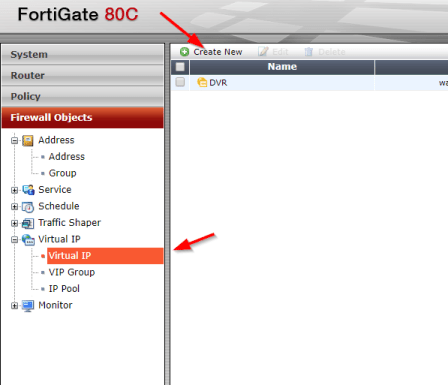
After logging into to the Fortinet portal, got to Firewall Objects –> Virtual IP –> Virtual IP, select Create New

create_virtual_ip

There are number of parameters:

Name: Short description of services e.g. DVR HTTP-80

External Interface: this is the port connected to the internet link with the public IP address.

External IP Address/Range: this use only need if you have more that one IP address configured on the port. If not, you can leave the default 0.0.0.0

Mapped IP Address/Range: Enter the internal server IP address of device. e.g. our DVR 192.168.0.12

Port Forwarding: tick this option if you are using custom ports from the default e.g. external service port is 5000 from the outside connecting to (map to) port 80 on the internal server.

virtual_ip_info

Go to Policy –>Policy –> Create New

create_policy

Select the Source Interface/Zone to external port.

Select destination Address to the Virtual IP created earlier and select Service to HTTP since we are using port 80. If the service is not list add it with the custom ports. Select Enable NAT to allow external IP address to access the internal device through the fortinet.

policy_settings

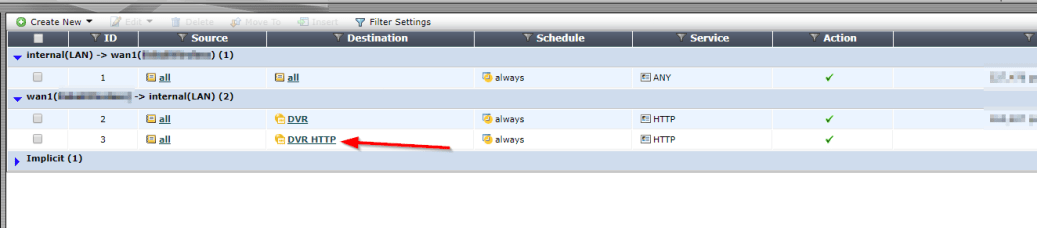
Once save by clicking ok, it will be listed under the external port source port column in the Policy section.

policy_listed