CCNP R&S Switch: Private VLANs

This article describes the Private VLANs on a Cisco switch.

There are three (3) type of Private VLANs:

  1. Primary
  2. Isolated
  3. Community

There are two port types that are associated with Private VLANs:

  • Promiscuous
  • Host

You can configure a host port to be associated with either an Isolated or Community VLAN.

Individual ports in an Isolated VLAN cannot communicate with any other port except the port in the primary VLAN.

All Ports in a Community VLAN can communicated with other ports in the same VLAN and with the port in the Primary VLAN.

Promiscuous port can communicate with all ports in either an Isolated or Community VLAN that it is associated with.

Private VLANs can be replicated to other switches using VTPv3.

Secondary VLANs (Community and Isolated) can only be mapped to one Primary VLAN (Promiscuous).

Cisco reference: https://www.cisco.com/c/en/us/td/docs/switches/lan/catalyst4500/12-2/50sg/configuration/guide/Wrapper-46SG/pvlans.pdf

Method of Changing the SID of a Windows Server 2016 VM

In a virtual environment, there are scenarios where you would want to clone an existing Windows server virtual machine to provide redundancy for whatever application.

Having the ability to create duplicate virtual machines by cloning it is a great feature but it creates a problem in a Windows Active Directory environment. There is a unique identifier called Security ID also known as SID which is created during installation to identify each machine in a Windows environment.

Active Directory has a big problem when it discovers two machines with the same SID because it identify them as the same object. If the computer with the same SID attempts to join the same domain, it will generate an error and terminate the process. No worries, there is a solution for the Windows computer.

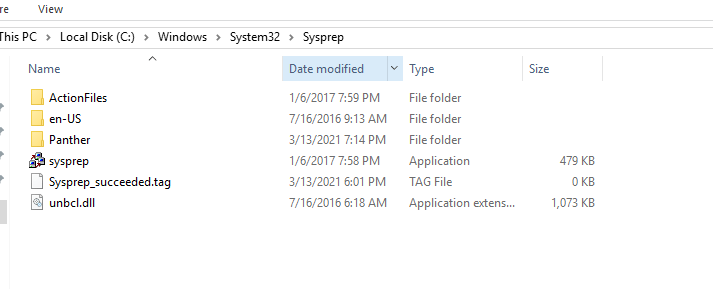
Microsoft has included a tool called Sysprep which is natively installed on Windows server which is located in the folder path:

%systemroot%\System32\Sysprep

To start the process, you will navigate to the folder and follow the steps below:

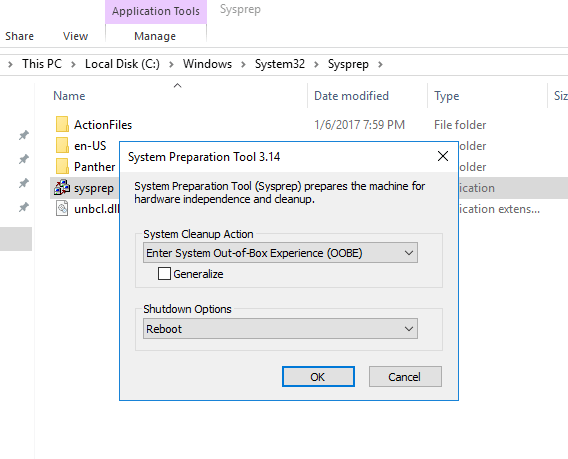
  • Right click and Run the System Preparation Tool (Sysprep.exe) as an administrator
  • Select the option Enter System Out-of-Box Experience (OOBE) for System Cleanup Action with the option Generalize ticked.
  • Select the Shutdown option: Reboot
  • Then select OK.

Once the virtual machine reboots, it will prompt to select the usually Microsoft settings during initialization, accept the EULA and to set the Administrator password.

Note that this method does not remove any installed applications except device drivers. It also removes the usually windows configuration such as IP address and machine name.

The SysPrep will work in other versions of Windows.

reference: https://docs.microsoft.com/en-us/windows-hardware/manufacture/desktop/sysprep–generalize–a-windows-installation

CCNP Route 300-101 – OSPF

This article was written about OSPF as I prepare for the CCNP. It was be updated as I progress.

OSPF is the acronym for Open Shortest Path First which is a vendor mutual routing protocol.

  • Shortest Path First SPF Algorithm for calculating the cost.
  • Default hello timer: 10 seconds
  • Default dead timer: 40 seconds (4 x hello)
  • Multicast address: 224.0.0.5 and 224.0.0.6
  • Communication Protocol:
  • Administrative distance of 110
  • Process ID is local significant and is not required to be the same with the neighbors.
  • The router ID is set using the following method in order:
    • using the router-id command
    • the highest IP address on the active loopback interface
    • The highest IP address on the active physical interface
  • Link State Updates (LSU) send every 30 minutes

OSPF neighbor relationship

OSPF States

Down –> Init –> 2Way –> ExStart –> Exchange –> Loading –> FULL

OSPF Packet Types

Type 1 – Hello

The purpose is to maintain the neighbor relationship using it as a keepalive.

debug ip ospf events of packet type 1debug_hello

Wireshark capture of packet type 1.OSPFType1Hello

Type 2 – Database Description (DBD)

debug ip ospf events of packet type 2debug_DBD.png

Wireshark capture of packet type 2ospftype2-dbdesc

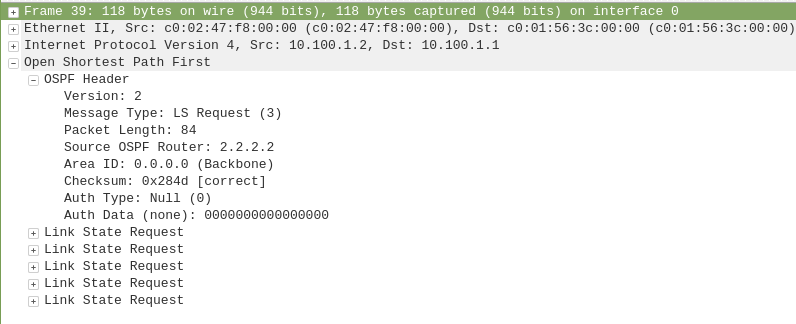
Type 3 – Link State Request (LSR)

debug ip ospf events of packet type 3debug_LSR

Wireshark capture of packet type 3ospf-type3-LSReq

Type 4 – Link State Update (LSU)

debug ip ospf events of packet type 4debug_LSU

Wireshark capture of packet type 4ospf-type4-lsupdate

Type 5 – Link State Acknowledge (LSAck)

debug ip ospf events of packet type 5debug_LSAck

Wireshark capture of packet type 5ospf-type5-lsAck

OSPF Network Types

  • Loopback – Stub Host – /32
  • P2P – Point-to-Point – HDLC
  • Broadcast – FastEthernet – DR/BDR
  • NBMA -Non-Broadcast Multi Access
  • P2MP – Point-to-Multipoint –
  • Virtual Links

OSPF Area and Router Types

ASBR – Autonomous System Border Router

ABR – Area Border Router

Stubby Area

Totally Stubby Area

Not-So Stubby Area

CCNP Encore: Configuring GRE Tunnel over IPSec

This article will be showing how to configure a Generic Encapsulation Tunnel also known as GRE Tunnel over IPSec.

disclaimer: note that this is a lab exercise only to show the configuration steps stated and may require additional modification based on your network environment.

The following network topology will be used to demonstrate this exercise.

Network Topology

The initial basic router configuration are below:

R1 configuration:

interface fastethernet 0/0
ip address 192.0.2.1 255.255.255.252
no shut
!
int loopback 0
ip address 1.1.1.1 255.255.255.255
!
router ospf 1
network 0.0.0.0 0.0.0.0 area 0
!
R2 configuration:

interface fastethernet 0/0

ip address 192.0.2.2 255.255.255.252

no shut

!

interface fastethernet 0/1

ip address 203.0.113.1 255.255.255.252

no shut

!

int loopback 0

ip address 2.2.2.2 255.255.255.255

!

router ospf 1

network 0.0.0.0 0.0.0.0 area 0

!

R3 configuration:

interface fastethernet 0/1

ip address 198.51.100.1 255.255.255.252

no shut

!

interface fastethernet 0/0

ip address 203.0.113.2 255.255.255.252

no shut

!

int loopback 0

ip address 3.3.3.3 255.255.255.255

!

router ospf 1

network 0.0.0.0 0.0.0.0 area 0

!

R4 configuration:

interface fastethernet 0/0

ip address 198.51.100.2 255.255.255.252

no shut

!

int loopback 0

ip address 4.4.4.4 255.255.255.255

!

router ospf 1

network 0.0.0.0 0.0.0.0 area 0

!

Before going into the task, there are some information that is important to know why IPSec is with a GRE Tunnel:

  • GRE Tunnel
    • It is used to encapsulated the packets over a network between two network devices.
    • it does not provide encryption which makes it unsecure
  • IPSec
    • It is secure by providing encryption
    • it only supports uni-cast traffic which presents a problem for routing protocols that uses multicast to function.

What are the use cases for this technology?

Combining both technology makes it a suitable solution to create a secure connections over public or unsecured networks between two networks.

Lab Exercise

Once the routers has been configured accordingly using the initial base configuration, it is time to start the exercise.

In this exercise, two task are going to be done:

  1. Configure a GRE Tunnel between R1 and R4
  2. Configure a IPSec tunnel

Step 1 – Configure the GRE tunnel on R1 and R4

  • Create a tunnel interface

R1(config)# interface tunnel 1

  • Assign an ip address to the tunnel interface

R1(config-if)# ip address 192.168.0.1 255.255.255.252

  • Set the source interface from where the tunnel will be connected

R1(config-if)# tunnel source fastethernet 0/0

  • Set the destination address of the router at the other end of the tunnel

R1(config-if)# tunnel destination 198.51.100.2 255.255.255.252

Note: repeat the same steps on router R4 but replacing the respective source interface and destination address. It is important to note that the tunnel # is locally significant.

you can check the status of the tunnel after step 1 by running the show command as follows:

R1(config)# do show ip interface brief

Step 2 – Configure a IPSec tunnel

  • Setup Phase 1 – set ISAKMP policy

R1(config)# crypto isakmp policy 14

  • Set encryption type

R1(config-isakmp)# encryption aes

  • Set authentication type

R1(config-isakmp)# authentication pre-share

R1(config-isakmp)# group 2

R1(config-isakmp)# exit

  • Set ISAKMP key and transform mode

R1(config)# crypto isakmp key 0 [keypass] address [192.51.100.2]

R1(config)# crypto ipsec transform-set [KWTRAIN] esp-aes esp-sha-hmac

R1(cfg-crypto-trans)# mode [transport|tunnel]

R1(cfg-crypto-trans)# exit

  • Configure an ACL for the traffic allowed to traverse the IPSec tunnel

R1(config)# ip access-list extended GRE-IN-IPSEC

R1(config-ext-nacl)# permit gre any any

R1(config-ext-nacl)# exit

  • Setup Phase 2 – linking ACL, transform set and peer ip to IPSec tunnel

R1(config)# crypto map VPN 10 ipsec-isakmp

R1(config-crypto-map)# match address GRE-IN-IPSEC

R1(config-crypto-map)# set transform-set KWTRAIN

R1(config-crypto-map)# set peer 198.51.100.2

R1(config-crypto-map)# exit

  • mapping interface to IPSec tunnel

R1(config)# interface f0/0

R1(config-if)# crypto map VPN

R1(config-if)# end

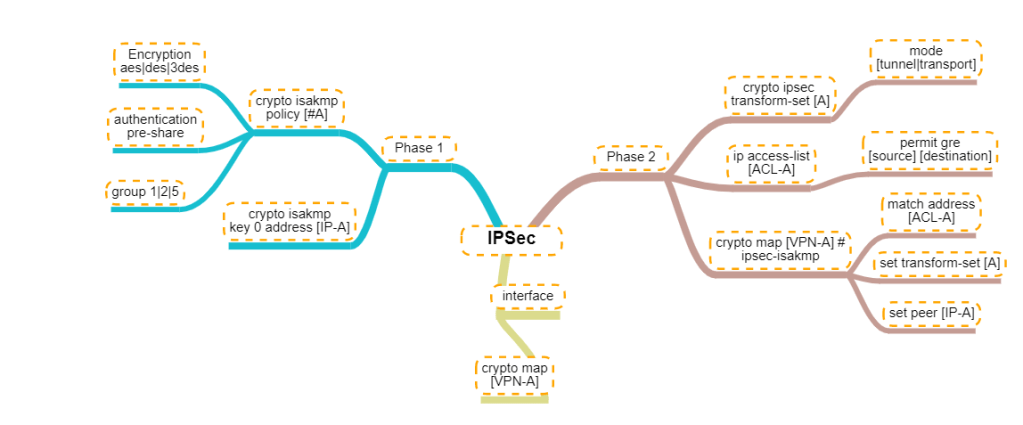
For person who are visual learners, here is a mind map of the configurations below.

Mindmap of the IPSec configuration commands

VMware VCP 6.7-DCV – Objective 1.8 – Differentiate between VDS and VSS

The following notes will assist you to prepare for this objective:

  • You will need to know the features set of both type of switch
    • Standard and Distributed switch
    • Select the appropriate switch given a scenario
    • Understand level of effort in administration
  • Don’t let questions mislead you on feature set
    • Standard switches have significant functionality
  • Learn what the standards actually mean
    • IEEE 802.1q / IEEE 802.3ad
  • Also be able to differentiate discovery protocols
    • When would you use LLDP or CDP?
    • Does that affect switch choice?
  • Be able to determine when a feature is appropriate
    • Health check
    • Beacon probing – detect uplink failure
    • Notify switches – switch cache mac address
    • Roll back
    • Traffic shaping
    • NIOC
  • Questions on NIC teaming rules are possible
  • Can you draw out how traffic flows given each load balancing algorithm is used?
    • Route based on originating virtual port
    • Route based on source MAC hash
    • Route based on source IP hash
    • Route based on physical NIC load
    • Explicit failover order

Reference:

vSphere Networking Guide pdf – Chapter 8 – Networking Policies

VMware VCP 6.7-DCV – Objective 1.7 – Describe and identify resource pools and use cases

The following notes will assist you to prepare for this objective:

  • Resource management is an essential skills for passing VCP-DCV
    • What resource are you being asked to control?
    • Different resources have different controls
  • Know the resource pool settings
    • You need to be able to select the right settings for a scenario
    • Proportional share allocation
  • Why use resource pools

Reference:

VMware VCP 6.7-DCV – Objective 1.9 – Describe the purpose of cluster and the features it provides

The following notes will assist you to prepare for this objective:

  • Be aware of additional features of both HA and DRS
    • HA provides option to enable VM fault tolerance
    • HA provides optional VM Component Protection
    • DRS rules control placement (affinity)
    • DRS provides optional DPM
  • Make sure you have read and experimented with admission control
    • Remember this is a gating of VM power on operations
    • What is slot size? Different from %?
  • Ultimately DRS is automating vMotion
    • So what stops vMotion from working?
    • Incompatible CPUs!
  • Ensure you have looked at Enhanced vMotion Compatibility (EVC)
    • Can you explain CPU masking?
    • Can you pick the appropriate use-case from implementation of either?
  • You need to have awareness of vMotion Encryption

Reference:

vSphere Availability Guide pdf – Chapter 2 – Creating and Using vSphere HA Clusters

vSphere Resource Management Guide pdf

  • Chapter 10 – Managing Resource Pools
  • Chapter 11 – Creating a DRS Cluster

vSphere Security Guide pdf – Chapter 6 – Encrypted vSphere vMotion

Windows 10: Opening Program management tools and features from command prompt

Sometimes you may want to run open Programs and Features without searching for it in the Control Panel. Another reason to require these commands is to run them with administrative privileges.

You can open the Run using [Windows KEY] + [R] or the cmd or even in PowerShell ISE

appwiz.cpl – open the Programs and Features window.

appwiz

devmgmt.msc – open the device manager

devmgmt

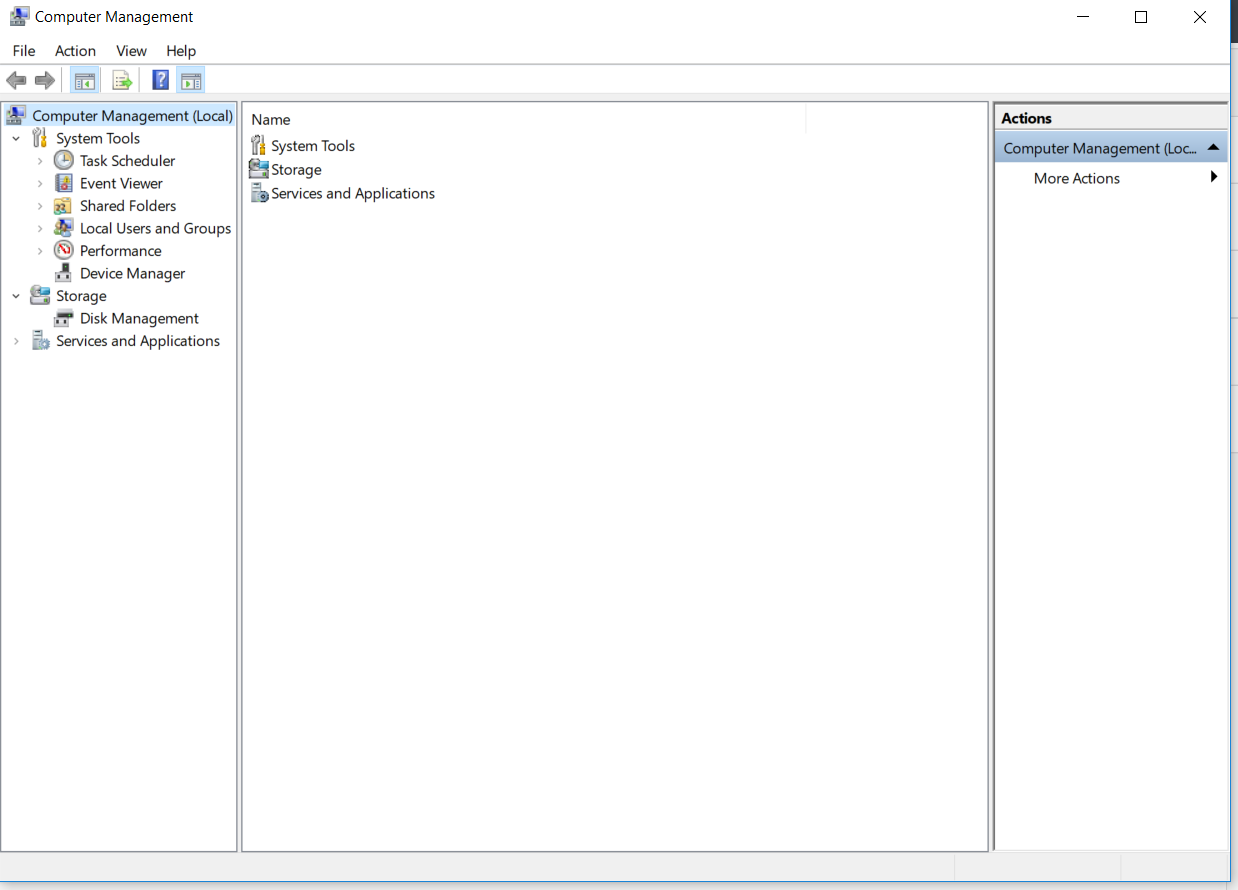
compmgmt.msc – open the computer management

compmgmt

diskmgmt.msc – opens the disk management

diskmgmt

lusrmgr.msc – opens the local users and groups management

lusrmgr

I will update this article with more useful commands as I identify them.


CCNP Route 300-101 – Policy Based Routing

Policy-based routing (PBR) is a process whereby the device puts packets through a route map before routing them.  (Cisco Reference)

Policy Based Routing is applicable to scenarios where you want to route a source IP address through a specific gateway IP address to a specific destination. Policy Based Routing relies on route-map to performs it functions which then uses access-list or prefix list to identify the respective source or destination IP address.

policybasedrouting

Configure Policy Based Routing

Step 1 – Configure Access list

R1(config)# ip access-list standard PC1-INT

R1(config-access-list)# permit ip host [PC1-IPAddress] [DestinationIP-Subnet]

Step 2 – Configure the Route map

R1(config)# route-map ISP2-INT [Sequence#]

R1(config-route-map)# match ip address [ISP2-INT]

R1(config-route-map)# set ip next-hop [ISP2]

Step 3 – Apply the Route map on the inbound interface

R1(config)# interface f0/0

R1(config-f)# ip policy route-map ISP2-INT

That is it for the configuration example for the Policy Based Routing.

There are a number of points to note about PBR:

  1. The implicit deny at the end of the route-map does not drop the packet but allow the  traffic to be routed but the normal routing table.
  2. There is an option to include a keyword “default” in the route-map set parameter which tells the router to check the routing table for this destination address before apply the next hop:
    1. set ip default next-hop [IPAddress]
  3. Match all parameter can be applied by not setting any match conditions in the route map.


This is it for the Policy Based Routing and you can refer to Cisco documentation for further information.