
PPPoE is the ability to negotiate a direct PPP link between multiple layer 3 devices
through a layer 2 switched infrastructure. This negotiation then allows the encapsulation of IP packets inside of PPP which is then encapsulated inside an Ethernet frame.
definition reference: https://learningnetwork.cisco.com/docs/DOC-27502
PPPoE Session Process
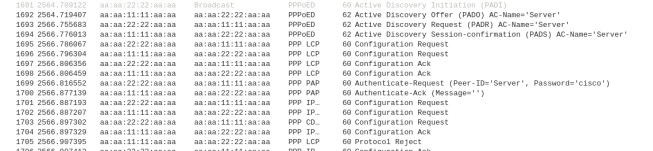
- PPPoED Active Discovery Initiation (PADI) – The PPPoE client sends a broadcast
- PPPoED Active Discovery Offer (PADO) – The PPPoE server reply with an session offer
- PPPoED Active Discovery Request (PADR) – The PPPoE client request to connect to session
- PPPoED Active Discovery Session-confirmation (PADS) – The PPPoE server confirms session connection
PPPoED Active Discovery Terminate (PADT) – the session is terminated by client/server or due to configuration mismatch after it is shared between client and server.
The image below display a wireshark capture of the PPPoE session process mentioned above. Client MAC address contains 1111 and the Server contains 2222.
Configuring PPPoE Server
1. Configure the virtual template interfaces which allows server to set the configuration template for the each client virtual interface.
R(config)# interface virtual-template 1
R(config-if)# ip address [IP] [Mask]
!Configuring the MTU is necessary so that you don’t have packet fragmentation due to PPP use 2 Bytes and PPPoE uses 6 Bytes of the packet
R(config-if)# mtu 1492
!The peer command is optional if you want to assign an ip address to the clients from a static or DHCP pool
R(config-if)# peer default ip address [pool|dhcp|dhcp-pool] NAME
!The PPP Authentication is optional
R(config-if)# ppp authentication [pap|chap] callin
! After configuring the PAP/CHAP Authentication, you need to configure a username and password
R(config)# username [USER] password [PASSWORD]
2. Configure the Broadband Aggregation (BBA) Group which is used to spawn a virtual interface for each client that dials into the server and assign the virtual template.
R(config)# bba-group pppoe global
R(config-bba-group)#virtual-template 1
3. Configure the physical interface through which the clients will be connecting and assign it the bba group.
R(config)# interface [interface id]
R(config-if)#pppoe enable group global
R(config-if)# no shutdown
Configuring the PPPoE Client
1. Configure the interface Dialer
R(config)# interface Dialer 1
R(config-if)# encapsulation ppp
R(config-if)# ip address
R(config-if)#mtu 1492
R(config-if)#dialer pool 2
!Optional to configure authentication if server requires it
!PAP configuration to send username and password if needed by server
R(config-if ) ppp pap send-uername [USER] password [PASSWORD]
!CHAP configuration to send username(hostname) and password
R(config-f)ppp chap password [PASSWORD]
R(config-f)ppp chap hostname [USER]
2. Associate the physical interface with the dialer on which the PPPoE session will dial out.
R(config)# interface f0/0
R(config-if)# pppoe-client dial-pool-number 2
R(config-if)# no shutdown
Verify and Troubleshoot PPPoE
To verify pppoe is working, use the following commands:
1. Display the PPPoE session – show if the session is established
R# show pppoe session
2. Use debug to show PPPoE Events – displays PADI/PADO/PADR/PADR process
R#debug pppoe events
3. Use debug to show PPP negotiation – displays ppp configuration exchange
R#debug ppp negotiation
This is it for the PPPoE, I hope it helps in knowing how to configure PPPoE.
 IT Wiz Technology Blog
Excellent goods from you, man. I’ve keep in mind your stuff previous to and you’re simply too excellent.
I actually like what you have obtained here, really like
what you are stating and the best way during which you say it.
You are making it enjoyable and you continue to care for
to stay it wise. I can not wait to read far more from you.
This is really a terrific site.
LikeLike