VCP65-DCV – Objective 2.1 – Configure policies/features and verify vSphere networking

The following reference material from the vSphere 6.5 online documentation will assist you in cover the main information that is need to know the section:

  1. Import a vSphere Distributed Switch Configuration
  2. know the commands:
    • esxcli network

    • esx-cfg-vswitch

  3. Chapter 3 – vSphere 6.5 networking guide
  4. Migrating VM to or from a vDistributed Switch
  5. Migrating VM Networking to the vDistributed Switch
  6. LACP Support on a vDistributed Switch
  7. Configure NIC Teaming
  8. Deep Dive vSphere Networking (blogs.jgriffiths.org)
  9. What is beacon probing? (VMware KB 1005577)
  10. EST – External Switch Tagging (vlan)
  11. VST – Virtual Switch Tagging (vSwitch tag)
  12. VGT – Virtual Guest Tagging (VM Tagging)
  13. Edit the traffic shaping Policy on a Distributed Port Group or Distributed Port
  14. VMware KB 1038827
  15. What is a jumbo frame in ethernet (www.slashroot.in)
  16. vSphere Networking Rollback
  17. Requirements for Migration between vCenter Server Instance
  18. Host Configuration for vMotion
  19. vSphere vMotion Networking Requirements
  20. Configuration Maximum Guide
  21. Create a Custom TCP/IP stack
  22. Overriding the default gateway of a VMkernel adapter
  23. Setting up vmkernel networking
  24. vSphere 5.1/5.5 Port mirroring (virtualized-awesome.weebly.com)
  25. Port Mirroring Session Types
  26. Configure the Netflow settings of a vSphere Distributed Switch

VCP65-DCV Objective 1.4 – Secure vSphere Virtual Machines

The following reference material from the vSphere 6.5 online documentation will assist you in cover the main information that is need to know the section:

  1. Virtual Disk Encryption
  2. UEFI Secure boot for ESXi Host
  3. Enable or disable UEFI Secure boot for a Virtual Machine
  4. VMTools installation configuration security considerations (WP)
  5. Securing Virtual Machine
  6. Disable Copy and Paste Operations Between Guest Operating System and Remote Console
  7. Virtual Machine Security Best Practices
  8. Encrypted vSphere vMotion

VCP65-DCV Objective 1.3 – Configure and Enable SSO and Identity Sources

The following reference material from the vSphere 6.5 online documentation will assist you in cover the main information that is need to know the section:

  1. vCenter Server Platform Service Controller Deployment Types
  2. Understanding vSphere Domains, Domain Names and Sites
  3. Configure vCenter Single Sign-On Identity Sources
  4. Use VMCA as an Intermediate Certificate Authority
  5. Disable and Enable vCenter Single Sign-On Users
  6. Add a User to the System.Configuration.BashShellAdministrators Group
  7. Edit the vCenter Single Sign-On Password Policy
  8. Configure a Host to Use Active Directory
  9. Set up the Key Management Server Cluster
  10. Encryption Process Flow
  11. VMware vSphere 6.5 VM encryption details (VLADAN.FR)

VCP65-DCV Objective 1.2 – Secure ESXi and vCenter Server

The following reference material from the vSphere 6.5 online documentation will assist you in cover the main information that is need to know the section:

  1. Enable or Disable UEFI Secure Boot for a Virtual Machine
  2. UEFI Secure Boot for ESXi Hosts
  3. Incoming and Outgoing Firewall Ports for ESXi Hosts
  4. NFS Client Firewall Behavior
  5. Securing ESXi Host
  6. Assigning Privileges for ESXi Hosts
  7. Set the vCenter Server Password Policy
  8. Lockdown Mode
  9. Disable the Managed Object Browser
  10. ESXi Passwords and Account lockout
  11. Best Practices for vCenter Server Access Control
  12. Manage Certificates with the Platform Services Controller Web Interface
  13. Using the MOB to explore the Object Model
  14. Securing vCenter Server
  15. Preventing a Virtual Machine User or Process from Disconnecting Devices

VCP65-DCV Objective 1.1 – Configure and Administer Role-based Access Control

To effectively master Objective 1.1 of the VCP65-DCV (2V0-622/D) exam guidelines which covers the topic Configure and Administer Role-based Access Control, it is important to know the following information:

(you can click on the heading to go directly to the VMware vSphere 6.5 online documentation  where these information are stored.)

  1. Multiple Permission Settings
  2. Required Privileges for Common Tasks
  3. vCenter Server System Roles
  4. Example 3: User Role Overriding Group Role
  5. Prerequisites and Required Privileges for Encryption Tasks
  6. Configuring vCenter Single Sign-On Identity Sources
  7. Understanding the vCenter Server Permission Model
  8. Permission Validation
  9. Using Roles to Assign Privileges

Setting Up iSCSI in VMware ESXi 5.5

To begin this article, let me first discuss what is iSCSI and then the reason for requiring an iSCSI.

I love the definition of iSCSI provided by searchstorage.techtarget.com which stands for Internet Small Computer System Interface, that works on top of the Transport Control Protocol (TCP) and allows the SCSI command to be sent end-to-end over local-area networks (LANs), wide-area networks (WANs) or the Internet.

According to the same site, iSCSI works by transporting block-level data from an iSCSI initiator on a server and a iSCSI target on a storage device. The iSCSI protocol encapsulates SCSI commands and assembles the data in packets for the TCP/IP layer. Packets are sent over the network using a point-to-point connection.

The one of the main reason for using iSCSI connections is that it allows for the utilization of existing network resources such as NICs and network switches to present storage devices to servers once it has the iSCSI initiator software. this result in cost saving and it is is easily configured and it is available for both LAN, WAN and internet which mean easily access if it is relocated to the cloud

Now, let us go to the fun part…configuration of iSCSI in Vmware ESXi 5.5

It is important to note that there are two type of iSCSI initiator/target:

  1. Software
  2. Hardware

In this article, we are only going to go through the configuring of the Software iSCSI initiator from within the VMware Esxi 5.5 hypervisor.

Log into vSphere Web client

Select Host and Clusters

hostandcluster.png

Select the host you want you want to setup the the iSCSI Software adapter on.

Under the Host pane, select the Manage

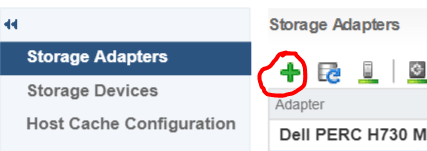
Under Manage, Select Storage then Storage Adapters

ManageStorage_StorageAdapter

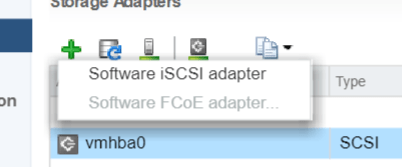
Select the Plus button

Storage-menu

Select Software iSCSI Adapter

software iscsi

Select OK to the following message

software-iscsi-msg-e1503502080853.png

Under Storage Adapters list, look for iSCSI Software Adapter and you will see the iSCSI Software Adapter listed.

software-iscsi-adapter.png

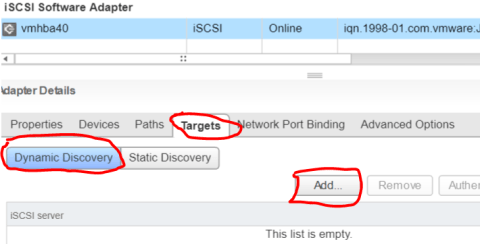
Highlight the adapter vmhbaXX (e.g. vmhba40) and under Adapter Detail, select Target –> Dynamic –> Add

AddDynamicTarget

Note: this allows you to add the primary IP address of the SAN or storage which allows the device LUNs to be discovered.

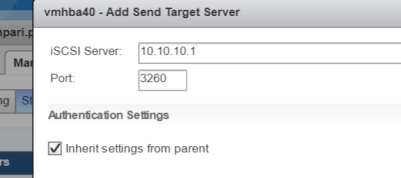
Enter the IP address of the target and leave the default port of 3260 for ISCSI communication. Then Select OK. For every iSCSI target, the IP address should be added.

SendTargetServer


CIA – Confidentiality, Integrity and Availability

Confidentiality – is the method of ensuring that only authorized persons are able to view the company data.

Integrity – is the method of ensuring that only authorized persons are allowed to modify the company data.

Availability – is the method of ensuring that the authorized persons are able to access the company data when it is need.

Preparing for VCP 6.5 DCV Delta Exam (2V0-622D)

I had prepared and passed my VMware VCP 6.5 DCV Exam (2V0-622D) within 2 months of my VCP certification expiration date in June 2018.

It was a rough and challenging journey but I had overcome all obstacles by using the following techniques. I prepared for my exam doing self study using:

I also created a study plan schedule using the exam guidelines covering each objectives section for one day. For an up to date exam guidelines, please refer to the VMware website.

Exam Topics –  (Sections hyperlinked to my study notes reference material)
Section 1 – Configure and Administer vSphere 6.x Security
Objective 1.1 – Configure and Administer Role-based Access Control
Objective 1.2 – Secure ESXi and vCenter Server
Objective 1.3 –Configure and Enable SSO and Identity Sources
Objective 1.4 – Secure vSphere Virtual Machines
Section 2 – Configure and Administer vSphere 6.x Networking
Objective 2.1 – Configure policies/features and verify vSphere networking
Objective 2.2 – Configure Network I/O control (NIOC)
Section 3 –Configure and Administer vSphere 6.x Storage
Objective 3.1 – Manage vSphere Integration with Physical Storage
Objective 3.2 – Configure Software-Defined Storage
Objective 3.3 – Configure vSphere Storage Multipathing and Failover
Objective 3.4 – Perform VMFS and NFS configurations and upgrades
Objective 3.5 – Set up and Configure Storage I/O Control (SIOC)
Section 4 – Upgrade a vSphere Deployment to 6.x
Objective 4.1 – Perform ESXi Host and Virtual Machine Upgrades
Objective 4.2 – Perform vCenter Server Upgrades (Windows)
Objective 4.3 – Perform vCenter Server migration to VCSA
Section 5 – Administer and Manage vSphere 6.x Resources
Objective 5.1 –Configure Multilevel Resource Pools
Objective 5.2 – Configure vSphere DRS and Storage DRS Clusters
Section 6 – Back up and Recover a vSphere Deployment
Objective 6.1 – Configure and Administer vCenter Appliance Backup/Restore
Objective 6.2 – Configure and Administer vCenter Data Protection
Objective 6.3 – Configure vSphere Replication
Section 7 – Troubleshoot a vSphere Deployment
Objective 7.1 – Troubleshoot vCenter Server and ESXi Hosts
Objective 7.2 – Troubleshoot vSphere Storage and Networking
Objective 7.3 – Troubleshoot vSphere Upgrades and Migrations
Objective 7.4 – Troubleshoot Virtual Machines
Objective 7.5 – Troubleshoot HA and DRS Configurations and Fault Tolerance
Section 8 – Deploy and Customize ESXi Hosts
Objective 8.1 – Configure Auto Deploy for ESXi Hosts
Objective 8.2 – Create and Deploy Host Profiles
Section 9 – Configure and Administer vSphere and vCenter Availability Solutions
Objective 9.1 – Configure vSphere HA Cluster Features
Objective 9.2 – Configure vCenter Server Appliance (VCSA) HA
Section 10 – Administer and Manage vSphere Virtual Machines
Objective 10.1 – Create and Manage vSphere Virtual Machines and Templates
Objective 10.2 – Create and Manage a Content Library
Objective 10.3 – Objective 10.3 is no longer covered in the exam content.
Objective 10.4 – Consolidate Physical Workloads using VMware vCenter Converter

Later, I will add my study notes to assists anyone with the information  gathered while studying. Stay tune.