CCNP Route 300-101 – OSPF

This article was written about OSPF as I prepare for the CCNP. It was be updated as I progress.

OSPF is the acronym for Open Shortest Path First which is a vendor mutual routing protocol.

  • Shortest Path First SPF Algorithm for calculating the cost.
  • Default hello timer: 10 seconds
  • Default dead timer: 40 seconds (4 x hello)
  • Multicast address: 224.0.0.5 and 224.0.0.6
  • Communication Protocol:
  • Administrative distance of 110
  • Process ID is local significant and is not required to be the same with the neighbors.
  • The router ID is set using the following method in order:
    • using the router-id command
    • the highest IP address on the active loopback interface
    • The highest IP address on the active physical interface
  • Link State Updates (LSU) send every 30 minutes

OSPF neighbor relationship

OSPF States

Down –> Init –> 2Way –> ExStart –> Exchange –> Loading –> FULL

OSPF Packet Types

Type 1 – Hello

The purpose is to maintain the neighbor relationship using it as a keepalive.

debug ip ospf events of packet type 1debug_hello

Wireshark capture of packet type 1.OSPFType1Hello

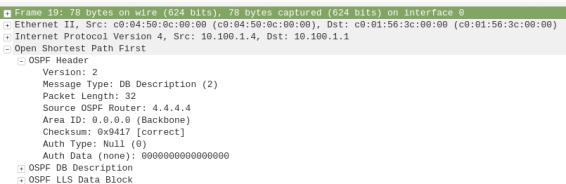
Type 2 – Database Description (DBD)

debug ip ospf events of packet type 2debug_DBD.png

Wireshark capture of packet type 2ospftype2-dbdesc

Type 3 – Link State Request (LSR)

debug ip ospf events of packet type 3debug_LSR

Wireshark capture of packet type 3ospf-type3-LSReq

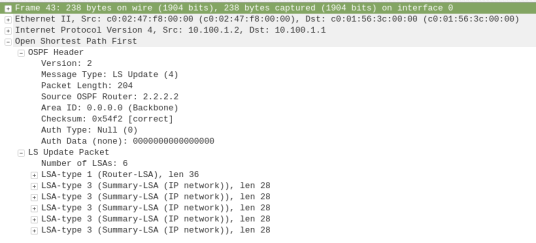
Type 4 – Link State Update (LSU)

debug ip ospf events of packet type 4debug_LSU

Wireshark capture of packet type 4ospf-type4-lsupdate

Type 5 – Link State Acknowledge (LSAck)

debug ip ospf events of packet type 5debug_LSAck

Wireshark capture of packet type 5ospf-type5-lsAck

OSPF Network Types

  • Loopback – Stub Host – /32
  • P2P – Point-to-Point – HDLC
  • Broadcast – FastEthernet – DR/BDR
  • NBMA -Non-Broadcast Multi Access
  • P2MP – Point-to-Multipoint –
  • Virtual Links

OSPF Area and Router Types

ASBR – Autonomous System Border Router

ABR – Area Border Router

Stubby Area

Totally Stubby Area

Not-So Stubby Area

CCNP Route 300-101 – Policy Based Routing

Policy-based routing (PBR) is a process whereby the device puts packets through a route map before routing them.  (Cisco Reference)

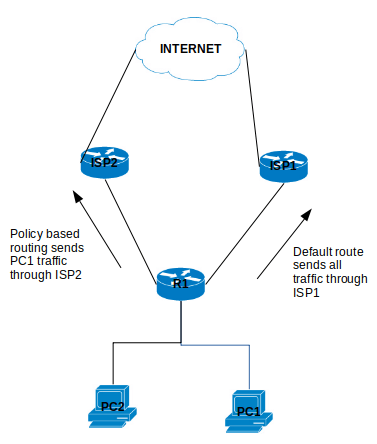
Policy Based Routing is applicable to scenarios where you want to route a source IP address through a specific gateway IP address to a specific destination. Policy Based Routing relies on route-map to performs it functions which then uses access-list or prefix list to identify the respective source or destination IP address.

policybasedrouting

Configure Policy Based Routing

Step 1 – Configure Access list

R1(config)# ip access-list standard PC1-INT

R1(config-access-list)# permit ip host [PC1-IPAddress] [DestinationIP-Subnet]

Step 2 – Configure the Route map

R1(config)# route-map ISP2-INT [Sequence#]

R1(config-route-map)# match ip address [ISP2-INT]

R1(config-route-map)# set ip next-hop [ISP2]

Step 3 – Apply the Route map on the inbound interface

R1(config)# interface f0/0

R1(config-f)# ip policy route-map ISP2-INT

That is it for the configuration example for the Policy Based Routing.

There are a number of points to note about PBR:

  1. The implicit deny at the end of the route-map does not drop the packet but allow the  traffic to be routed but the normal routing table.
  2. There is an option to include a keyword “default” in the route-map set parameter which tells the router to check the routing table for this destination address before apply the next hop:
    1. set ip default next-hop [IPAddress]
  3. Match all parameter can be applied by not setting any match conditions in the route map.


This is it for the Policy Based Routing and you can refer to Cisco documentation for further information.


CCNP Route 300-101 – VRF lite

This article is going to take you through the configuration of VRF lite. VRF stands for Virtual Routing/Forwarding which is technology that allows you to have multiple routing tables that are kept isolated on a router. It is a feature similar to VLANs on a switch. VRF lite allows you to use the same subnets for each

You can refer to this Cisco document for further details: https://www.cisco.com/c/en/us/td/docs/switches/lan/catalyst4500/12-2/25ew/configuration/guide/conf/vrf.html#wp1045190

Note that VRF is usually used when configuring MPLS but because we are not using it with MPLS, it is referred to as VRF lite.

Configuration of VRF lite for IPv4

The following steps will be required to successfully configure VRF lite:

  1. Create the VRF and set the route distinguisher (rd)

R1(config)# ip vrf [NAME]

R1(config-vrf)# rd 100:1

2. Assigning the interfaces to the VRF (Note: VRF clears the interface IP address so you will have to reconfigure the ip address after applying this command)

R1(config-if)# ip vrf forwarding [NAME]

Review VRF Configuration

  1. Show the Assigned VRF Interfaces

R1# show ip vrf interfaces

2. Show the VRFs

R1# show ip vrf

3. Show the Routing Table within a VRF

R1# show ip route vrf [NAME]

4. Show the routing protocols operating within VRF

show ip protocol vrf [NAME]

Configure EIGRP and VRF Lite

R1(config)# router eigrp AS

R1(config-router)# address-family ipv4 vrf [NAME] autonomous-system AS

R1(config-router-af)#network [Subnet] [wildcard_mask]

Configure OSPF and VRF Lite

R1(config)# router ospf [Process-id] vrf [NAME]

Configure RIPv2 and VRF Lite

R1(config)# router rip

R1(config-router)# address-family ipv4 vrf [NAME]

Configuration of VRF lite for both IPv4 & IPv6

  1. Create the VRF and set the route distinguisher (rd)

R1(config)# vrf definition [NAME]

R1(config-vrf)# rd 100:1

R1(config-vrf)#address-family [ipv4|ipv6]

2. Assigning the interfaces to the VRF (Note: VRF clears the interface IP address so you will have to reconfigure the ip address after applying this command)

R1(config-if)# ip vrf forwarding [NAME]

Export and Import Routes from one VRF to another

Importing routes from another VRF using the RD (route distinguisher)

R1(config-vrf)# route-import [RD]

Exporting routes from the VRF using the RD (route distinguisher)

R1(config-vrf)# route-export [RD]

example:

ip vrf GREEN

rd 100:1

route-export 100:1234

ip vrf RED

rd 200:1

router-import 100:1234

Set Default VRF Lite Name

This commands allows you to configure the router in the stated VRF mode.

R1#routing-context vrf [VRFNAME]

R1%VRFNAME#


CCNP Route 300-101 – SNMP

SNMP stands for Simple Network Management Protocol which is uses to manage your network devices by a management host.

There are three versions of SNMP:

  • SNMPv1
  • SNMPv2c
  • SNMPv3

SNMPv1 and SNMPv2c uses community-string as password which is sent in clear text.

On the other hand, SNMPv3 is able to provide both authentication and encryption to secure the communication. SNMPv3 uses users and groups to grant access which is applied using one of the three security levels.

The SNMPv3 Security Levels:

  • noAuthPriv (noauth)- provides no Authentication or Privacy (encryption)
  • AuthNoPriv (auth) – provides Authentication but no Privacy (encryption)
  • AuthPriv (priv) – provides Authentication and Privacy (encryption)

The authentication supports two algorithms: MD5 and SHA1, while encryption supports algorithms DES, 3DES and AES.

 Configuring SNMPv3

1. Configure the View

snmp-server view [VIEWNAME] iso included

2. Configure the Group

snmp-server group [GROUPNAME] v3 [noauth|auth|priv] [read RName] [write WName] [context CName] [notify NName] [access ACL]

3. Configure the User

snmp-server user [Username] [GroupName] v3 [encrypt] auth [md5|sha] [AuthPWD] priv [des|3des|aes] [PrivPassword] [access ACL]

4. Configure Traps

snmp-server host [IP] traps version [1|2|3] [noauth|auth|priv] [USER] [other_snmp_options]

Verify SNMPv3

show snmp user

snmpuser

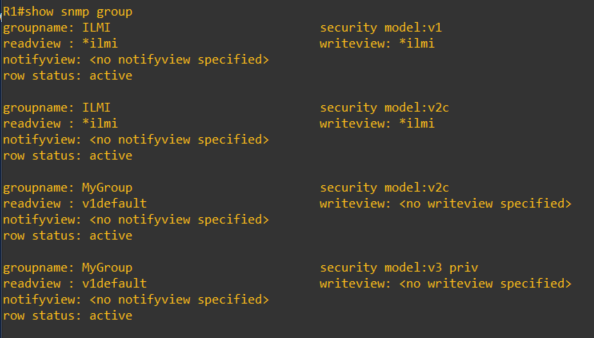
show snmp group

snmpgroup

This article covers some of the SNMP options and configuration of which I am covering in my CCNP studies. For further details, you can visit the Cisco documentations here.

CCNP Route 300-101 – EIGRP

EIGRP routing protocol for IPv4 and IPv6

  • Default hello messages timer: 5 seconds
  • Default hold-down timer: 15 seconds
  • Multicast address: 224.0.0.10 (IPv4) / FF02::A (IPv6)
  • IP Protocol: 88
  • Administrative distance of 90
  • Autonomous Number is required to be the same with the neighbors.

Basic EIGRP Configuration

!IPv4 EIGRP configuration

R(config)# router eigrp [AS]

R(config)#network [subnet] [wildcard_mask]

!IPv6 EIGRP configuration

R(config)# ipv6 router eigrp 1
R(config-router) eigrp router-id [X.X.X.X]
R(config-router) no shutdown

!Configure command under participating interface in IPv6 EIGRP

R(config-if) ipv6 eigrp [AS]

EIGRP Metrics

To enable to metric for EIGRP, you use the following commands:

R(config-router)# metric weights 0 [K1] [K2] [K3] [K4] [K5]

Where the K values are:

  • K1 – Bandwidth [Kbit/sec] (default 1)
  • K2 –  Load (default 0)
  • K3 – Delay (default 1)
  • K4 and K5 – Reliability (default 0)

Calculating the full Metric (Formula)

Metric = ([K1 * bandwidth + (K2 * Bandwidth) / (256 – Load) + K3 * Delay] * [K5 / (Reliability + K4)]) * 256

Calculating the Default Metric

eigrp_metric_calculation

EIGRP Packets

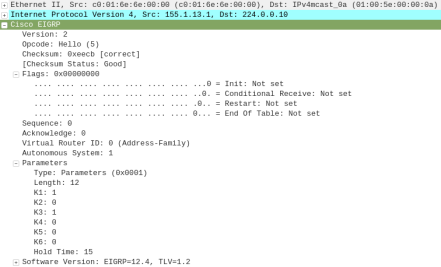
  • Hello (5)

eigrp_hello

  • Update (1)

eigrp_update

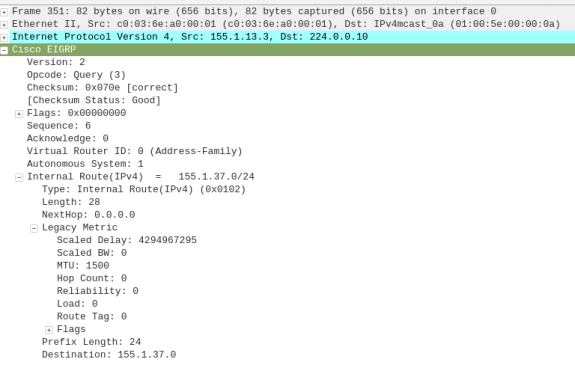
  • Query (3)

eigrp_query

  • Reply (4)

eigrp_reply

  • Ack (5)

eigrp_Hello_Ack

Administrative Distance (AD) – is how far is the router from it’s neighbor.

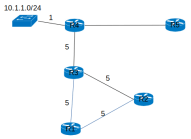
Feasible Distance (FD) – is how far is the router for the destination subnet.eigrp_diagram

  • R1 FD from 10.1.1.0/24 through R3
    • = (R1–>R3) + (R3–>R4) + (subnet 10.1.1.0/24)
    • = 5 + 5 + 1 = 11


Feasible successor – the advertised distance (AD) must be less than the feasible distance (FD) of the Successor (Feasible Successor AD < Successor FD)

EIGRP Neighborship

When the neighbor command is used, it forces the EIGRP to use unicast traffic to discover the neighbor.

R1(config-router)# neighbor [ip address]

The command and out display of the EIGRP neighbor:

show ip eigrp neighbors

show_eigrp_neighbor-cmd

As i continue my studies, this article will be updated.

CCNP Route 300-101 – RIPng

RIPng (RIP next generation) is the routing protocol RIP version for IPv6.

  • Default hello messages timer: 30 seconds
  • Default dead timer: 180 seconds
  • Multicast address: FF02::9
  • Communication Protocol: UDP 521
  • Administrative distance of 120
  • RIP name is not required to be the same with the neighbors.

Configure RIPng on a Router:

  1. Enable IPv6 routing in the global mode

ipv6 unicast-routing

2. Configure RIPng

IPv6 router rip [NAME]

3. Configure interface for IPv6

ipv6 address X:X:X:X::/64 [eui-64]

or

ipv6 enable 

4. Configure interface for RIPng

ipv6 rip [NAME[ enable

output for command: show ipv6 route rip

IPv6 Routing Table – 6 entries
Codes: C – Connected, L – Local, S – Static, R – RIP, B – BGP
U – Per-user Static route, M – MIPv6
I1 – ISIS L1, I2 – ISIS L2, IA – ISIS interarea, IS – ISIS summary
O – OSPF intra, OI – OSPF inter, OE1 – OSPF ext 1, OE2 – OSPF ext 2
ON1 – OSPF NSSA ext 1, ON2 – OSPF NSSA ext 2
D – EIGRP, EX – EIGRP external
R 2222::/64 [120/2]
via FE80::C202:46FF:FED7:0, FastEthernet0/0

output for command: show ipv6 rip

RIP process “WAN”, port 521, multicast-group FF02::9, pid 218
Administrative distance is 120. Maximum paths is 16
Updates every 30 seconds, expire after 180
Holddown lasts 0 seconds, garbage collect after 120
Split horizon is on; poison reverse is off
Default routes are not generated
Periodic updates 207, trigger updates 7
Interfaces:
FastEthernet0/1
FastEthernet0/0
Redistribution:
None

output for command: show ipv6 protocol 

IPv6 Routing Protocol is “rip WAN”
Interfaces:
FastEthernet0/1
FastEthernet0/0
Redistribution:
None

output for command: show ipv6 rip next-hops

RIP process “WAN”, Next Hops
FE80::C202:46FF:FED7:0/FastEthernet0/0 [2 paths]

This article will be updated as I go along.

CCNP Route 300-101 – Cisco Express Forwarding (CEF)

The Cisco Express Forwarding (CEF) is a Topology-Based switching technology. It is enabled by default on most cisco router and layer 3 switches.

device(config)# ip cef

The CEF is made up of two tables:

  • Forwarding Information Base (FIB)
  • Adjacency table

Forwarding Information Base (FIB) table – maintains next-hop Layer 3 address information based on the information in the IP routing table. CEF use the FIB to make IP destination prefix-based switching decisions. The command to show FIB below:

show ip cef

Adjacency Table – maintains Layer 2 next-hop addresses for all FIB entries. If the information is not available, ARP is used to discover this information. The command to show adjacency table below:

show adjacency

Type of Adjacency That requires Special Handling

  • Null – Packets destined for a Null0 interface
  • Glean – used for directly connected routes. Tells router to check ARP table
  • Punt – used for packets that cant be forwarded by CEF. it is sent to next level switching method
  • Discard – packets discarded by access-list or other policy
  • Drop – packets cant forward because of encapsulation error or unsupported protocol.

CEF can be enabled in one of two modes:

  • Central CEF mode – When CEF mode is enabled, the CEF FIB and adjacency tables reside on the route processor, and the route processor performs the express forwarding. You can use CEF mode when line cards are not available for CEF switching, or when you need to use features not compatible with distributed CEF switching.
  • Distributed CEF (dCEF) mode – When dCEF is enabled, line cards maintain identical copies of the FIB and adjacency tables. The line cards can perform the express forwarding by themselves, relieving the main processor – Gigabit Route Processor (GRP) – of involvement in the switching operation. This is the only switching method available on the Cisco 12000 Series Router.

Packets that CEF cannot handle:

  • IP Header Option
  • Expiring TTL
  • Tunnel interface
  • Exceed MTU
  • IGMP Redirect


Reference:

https://www.cisco.com/c/en/us/support/docs/routers/12000-series-routers/47321-ciscoef.html#cef-ops

https://www.cisco.com/c/en/us/td/docs/ios-xml/ios/ipswitch_cef/configuration/15-mt/isw-cef-15-mt-book/isw-cef-overview.html?referring_site=RE&pos=1&page=https://www.cisco.com/c/en/us/support/docs/routers/12000-series-routers/47321-ciscoef.html#GUID-993D4B0C-C032-420D-8304-F56AAB1CECC6


CCNP Route 300-101 – IPv6 Knowledge

This article is to share the knowledge about IPv6 (Internet Protocol version 6) in a simple way.

The first important knowledge you will needed to know before understanding IPv6 is that it is a 128-bit address that is represented using Hexadecimal values and it will be beneficial to know the binary and decimal equivalent.

Please see below the table showing this information:

Hex Binary Decimal
0 0000 0
1 0001 1
2 0010 2
3 0011 3
4 0100 4
5 0101 5
6 0110 6
7 0111 7
8 1000 8
9 1001 9
A 1010 10
B 1011 11
C 1100 12
D 1101 13
E 1110 14
F 1111 15

The next aspect of IPv6 Addressing to understand is that it is similar to IPv4 address where the address is split up into Octet (10.10.10.1) separated by a dot (.), IPv6 address are split up into quartet (2000:ABCD:0000:0000:0000:0000:0000:0001) separated by a colon (:). Each quartet is made up of 4 Hexadecimal number.

An example of an IPv6 address is below along with the binary of the address:

Quartet Hexadecimal Binary
1st 2000 0010 0000 0000 0000
2nd ABCD 1010 1011 1100 1101
3rd 0000 0000 0000 0000 0000
4th 0000 0000 0000 0000 0000
5th 0000 0000 0000 0000 0000
6th 0000 0000 0000 0000 0000
7th 0000 0000 0000 0000 0000
8th 0001 0000 0000 0000 0001

Shortening the IPv6 Address

there are two methods we can use to shorten the IPv6 address to make it easier to write which is also applied by supported devices.

  1. Eliminating the leading zeros
  2. Using the double colon (::) to represents multiple quartet of zeros. this can only be applied once in an IPv6 address.

let me use an example IPv6 address 2000:ABC0:00ED:0000:0000:1234:0000:0001

Applying shortening rule 1 to eliminating the leading zeros which will be:

2000 : ABC0 : 00ED : 0000 : 0000 : 1234 : 0000 : 0001
2000 : ABC0 : ED : 0 : 0 : 1234 : 0 : 1

Then we are going to apply rule 2 which is to use the double colon (::) to replace multiple quartet of zeros:

2000 : ABC0 : 0 : 0 : 1234 : 0 : 1
2000 : ABC0 :: 1234 : 0 : 1

IPv6 Prefix

The IPv6 address has two main parts to the address:

  1. Prefix (Network ID)
  2. Interface ID (Host ID)

The IPv6 Prefix is denoted by the CIDR /XX. For example 2000::/3 where /3 tells you the network portion of the IPv6 address space.

There are also subdivision of the Prefix:

  1. Registry Prefix – assigned by IANA to an RIR
  2. ISP Prefix – assigned by an RIR to an ISP
  3. Site Prefix (Global Routing Prefix) – assigned by an ISP to customer
  4. Subnet Prefix – assigned by a customer engineer internally

RIR – Regional Internet Registry

IANA – Internet Assigned Numbers Authority

IPv6 Address Types

The unspecified address is an address used by an IPv6 node that has not gotten an IPv6 address.

The Global address is the address space reserved to be routed on the internet which is assigned by the IANA.

The Multicast address is joined by IPv6 nodes depending on the class the device is apart of which will be discussed later.

The Link-local is the address automatically assigned by the IPv6 node using the EUI-64 method once the IPv6 is enabled on an interface.

Types of Address Binary Reality IPv6 method
Unspecified 0000…0 ::/128
Loopback 0000…1 ::1/128
Global 001… (first 3) 2000::/3 (2000 – 3FFF)
Multicast 1111 1111 (first 8) FF00::/8
Link-local 1111 1110 10… (first 10) FE80::/10

There is another special type of address which is the Extended Unique Identifier (EUI-64) that uses the MAC address (48-bit) as part of the IPv6 Address. The challenge with the MAC address is that it is short 16-bit so to make it 64-bit, FFFE will be place in the middle of the MAC address. Another modification that is required to derive the EUI-64 address is that the 7th bit must be flipped. To better understand this address, let me list the rules in a table:

Steps Rule Address
1 Get the Mac Address AAAA.BBBB.CCCC
2 Insert FFFE in the middle of the MAC AAAABB FFFE BBCCCC
3 Flip the 7th bit by converting the first 2 Hex to binary, flipping the 7th bit and then converting it back to Hexidecimal AA = 1010 1010

1010 1000 = A8

A8AA:BB FF:FE BB:CCCC

4 Apply the network prefix. in the example using link-local FE80::/8 FE80:0000:0000:0000:A8AA:BBFF:FEBB:CCCC /64
5 Shorten the IPv6 Address FE80::A8AA:BBFF:FEBB:CCCC /64

Local Multicast Address

IPv6 Local Multicast Address Description
FF02::1 All-node
FF02::2 all-routers
FF02::5 all-OSPF routers
FF02::6 OSPF designated routers
FF02::9 All RIP
FF02::A All-EIGRP
FF02::1:FFxx:xxxx solicited-node where x is the last 6 Hex of the IPv6 unicast address

IPv6 Node Layer 2 Communication

When a IPv6 node needs to communicate at the Layer 2 after receiving a multicast packet, the IPv6 node uses the following Layer 2 (MAC) address format:

3333 : xxxx : xxx1

where X is the last 8 Hex of the MAC address but the 8th Hex is change to 1 as shown above.

For the solicited address after the 3333, we will insert FF and then add the last 6 Hex as shown below:

3333 : FFxx : xxxx

IPv6 Address Dynamic Assignment

Stateless Address Auto Configuration (SLAAC)

  • The IPv6 address is derived using the Network prefix and adding the MAC address to it (EUI-64)
  • It used the Stateless DHCP
  • The prefix must be /64
  • There should be no DHCP IP pool configured on router

Stateful DHCP

  • The IPv6 address is dynamically assigned to the host by the DHCP server along with DNS and gateway.

Domain Name System (DNS) – RF6106

IPv6 Neighbor Discovery Protocol (NDP)

Network Discovery Protocol is defined in the RF 4861.

NDP Message Types

  • Router Solicitation (ICMPv6 type 133)
    • Asking router for information
  • Router Advertisement (ICMPv6 type 134)
    • Router responding with information
  • Neighbor Solicitation (ICMPv6 type 135)
    • Asking the neighbor for information
  • Neighbor Advertisement (ICMPv6 type 136)
    • Neighbor responding with information
  • Redirect (ICMPv6 type 137)
    • redirect of a packet

Function of NDP

  • Duplicate Address Detection (DAD)
  • Router Discovery
  • Address Configuration
  • L2 (link-level) Resolution
  • Redirection of a Packet