CCNP Route 300-101 – OSPF

This article was written about OSPF as I prepare for the CCNP. It was be updated as I progress.

OSPF is the acronym for Open Shortest Path First which is a vendor mutual routing protocol.

  • Shortest Path First SPF Algorithm for calculating the cost.
  • Default hello timer: 10 seconds
  • Default dead timer: 40 seconds (4 x hello)
  • Multicast address: 224.0.0.5 and 224.0.0.6
  • Communication Protocol:
  • Administrative distance of 110
  • Process ID is local significant and is not required to be the same with the neighbors.
  • The router ID is set using the following method in order:
    • using the router-id command
    • the highest IP address on the active loopback interface
    • The highest IP address on the active physical interface
  • Link State Updates (LSU) send every 30 minutes

OSPF neighbor relationship

OSPF States

Down –> Init –> 2Way –> ExStart –> Exchange –> Loading –> FULL

OSPF Packet Types

Type 1 – Hello

The purpose is to maintain the neighbor relationship using it as a keepalive.

debug ip ospf events of packet type 1debug_hello

Wireshark capture of packet type 1.OSPFType1Hello

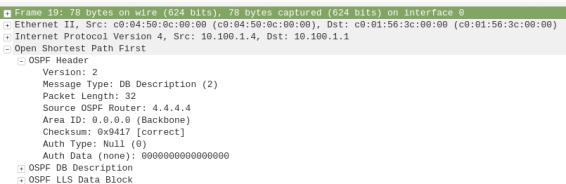
Type 2 – Database Description (DBD)

debug ip ospf events of packet type 2debug_DBD.png

Wireshark capture of packet type 2ospftype2-dbdesc

Type 3 – Link State Request (LSR)

debug ip ospf events of packet type 3debug_LSR

Wireshark capture of packet type 3ospf-type3-LSReq

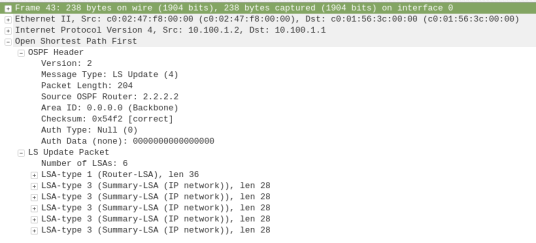
Type 4 – Link State Update (LSU)

debug ip ospf events of packet type 4debug_LSU

Wireshark capture of packet type 4ospf-type4-lsupdate

Type 5 – Link State Acknowledge (LSAck)

debug ip ospf events of packet type 5debug_LSAck

Wireshark capture of packet type 5ospf-type5-lsAck

OSPF Network Types

  • Loopback – Stub Host – /32
  • P2P – Point-to-Point – HDLC
  • Broadcast – FastEthernet – DR/BDR
  • NBMA -Non-Broadcast Multi Access
  • P2MP – Point-to-Multipoint –
  • Virtual Links

OSPF Area and Router Types

ASBR – Autonomous System Border Router

ABR – Area Border Router

Stubby Area

Totally Stubby Area

Not-So Stubby Area

CCNP Route 300-101 – VRF lite

This article is going to take you through the configuration of VRF lite. VRF stands for Virtual Routing/Forwarding which is technology that allows you to have multiple routing tables that are kept isolated on a router. It is a feature similar to VLANs on a switch. VRF lite allows you to use the same subnets for each

You can refer to this Cisco document for further details: https://www.cisco.com/c/en/us/td/docs/switches/lan/catalyst4500/12-2/25ew/configuration/guide/conf/vrf.html#wp1045190

Note that VRF is usually used when configuring MPLS but because we are not using it with MPLS, it is referred to as VRF lite.

Configuration of VRF lite for IPv4

The following steps will be required to successfully configure VRF lite:

  1. Create the VRF and set the route distinguisher (rd)

R1(config)# ip vrf [NAME]

R1(config-vrf)# rd 100:1

2. Assigning the interfaces to the VRF (Note: VRF clears the interface IP address so you will have to reconfigure the ip address after applying this command)

R1(config-if)# ip vrf forwarding [NAME]

Review VRF Configuration

  1. Show the Assigned VRF Interfaces

R1# show ip vrf interfaces

2. Show the VRFs

R1# show ip vrf

3. Show the Routing Table within a VRF

R1# show ip route vrf [NAME]

4. Show the routing protocols operating within VRF

show ip protocol vrf [NAME]

Configure EIGRP and VRF Lite

R1(config)# router eigrp AS

R1(config-router)# address-family ipv4 vrf [NAME] autonomous-system AS

R1(config-router-af)#network [Subnet] [wildcard_mask]

Configure OSPF and VRF Lite

R1(config)# router ospf [Process-id] vrf [NAME]

Configure RIPv2 and VRF Lite

R1(config)# router rip

R1(config-router)# address-family ipv4 vrf [NAME]

Configuration of VRF lite for both IPv4 & IPv6

  1. Create the VRF and set the route distinguisher (rd)

R1(config)# vrf definition [NAME]

R1(config-vrf)# rd 100:1

R1(config-vrf)#address-family [ipv4|ipv6]

2. Assigning the interfaces to the VRF (Note: VRF clears the interface IP address so you will have to reconfigure the ip address after applying this command)

R1(config-if)# ip vrf forwarding [NAME]

Export and Import Routes from one VRF to another

Importing routes from another VRF using the RD (route distinguisher)

R1(config-vrf)# route-import [RD]

Exporting routes from the VRF using the RD (route distinguisher)

R1(config-vrf)# route-export [RD]

example:

ip vrf GREEN

rd 100:1

route-export 100:1234

ip vrf RED

rd 200:1

router-import 100:1234

Set Default VRF Lite Name

This commands allows you to configure the router in the stated VRF mode.

R1#routing-context vrf [VRFNAME]

R1%VRFNAME#


CCNP Route 300-101 – RIPng

RIPng (RIP next generation) is the routing protocol RIP version for IPv6.

  • Default hello messages timer: 30 seconds
  • Default dead timer: 180 seconds
  • Multicast address: FF02::9
  • Communication Protocol: UDP 521
  • Administrative distance of 120
  • RIP name is not required to be the same with the neighbors.

Configure RIPng on a Router:

  1. Enable IPv6 routing in the global mode

ipv6 unicast-routing

2. Configure RIPng

IPv6 router rip [NAME]

3. Configure interface for IPv6

ipv6 address X:X:X:X::/64 [eui-64]

or

ipv6 enable 

4. Configure interface for RIPng

ipv6 rip [NAME[ enable

output for command: show ipv6 route rip

IPv6 Routing Table – 6 entries
Codes: C – Connected, L – Local, S – Static, R – RIP, B – BGP
U – Per-user Static route, M – MIPv6
I1 – ISIS L1, I2 – ISIS L2, IA – ISIS interarea, IS – ISIS summary
O – OSPF intra, OI – OSPF inter, OE1 – OSPF ext 1, OE2 – OSPF ext 2
ON1 – OSPF NSSA ext 1, ON2 – OSPF NSSA ext 2
D – EIGRP, EX – EIGRP external
R 2222::/64 [120/2]
via FE80::C202:46FF:FED7:0, FastEthernet0/0

output for command: show ipv6 rip

RIP process “WAN”, port 521, multicast-group FF02::9, pid 218
Administrative distance is 120. Maximum paths is 16
Updates every 30 seconds, expire after 180
Holddown lasts 0 seconds, garbage collect after 120
Split horizon is on; poison reverse is off
Default routes are not generated
Periodic updates 207, trigger updates 7
Interfaces:
FastEthernet0/1
FastEthernet0/0
Redistribution:
None

output for command: show ipv6 protocol 

IPv6 Routing Protocol is “rip WAN”
Interfaces:
FastEthernet0/1
FastEthernet0/0
Redistribution:
None

output for command: show ipv6 rip next-hops

RIP process “WAN”, Next Hops
FE80::C202:46FF:FED7:0/FastEthernet0/0 [2 paths]

This article will be updated as I go along.