CCNP Route 300-101 – SNMP

SNMP stands for Simple Network Management Protocol which is uses to manage your network devices by a management host.

There are three versions of SNMP:

  • SNMPv1
  • SNMPv2c
  • SNMPv3

SNMPv1 and SNMPv2c uses community-string as password which is sent in clear text.

On the other hand, SNMPv3 is able to provide both authentication and encryption to secure the communication. SNMPv3 uses users and groups to grant access which is applied using one of the three security levels.

The SNMPv3 Security Levels:

  • noAuthPriv (noauth)- provides no Authentication or Privacy (encryption)
  • AuthNoPriv (auth) – provides Authentication but no Privacy (encryption)
  • AuthPriv (priv) – provides Authentication and Privacy (encryption)

The authentication supports two algorithms: MD5 and SHA1, while encryption supports algorithms DES, 3DES and AES.

 Configuring SNMPv3

1. Configure the View

snmp-server view [VIEWNAME] iso included

2. Configure the Group

snmp-server group [GROUPNAME] v3 [noauth|auth|priv] [read RName] [write WName] [context CName] [notify NName] [access ACL]

3. Configure the User

snmp-server user [Username] [GroupName] v3 [encrypt] auth [md5|sha] [AuthPWD] priv [des|3des|aes] [PrivPassword] [access ACL]

4. Configure Traps

snmp-server host [IP] traps version [1|2|3] [noauth|auth|priv] [USER] [other_snmp_options]

Verify SNMPv3

show snmp user

snmpuser

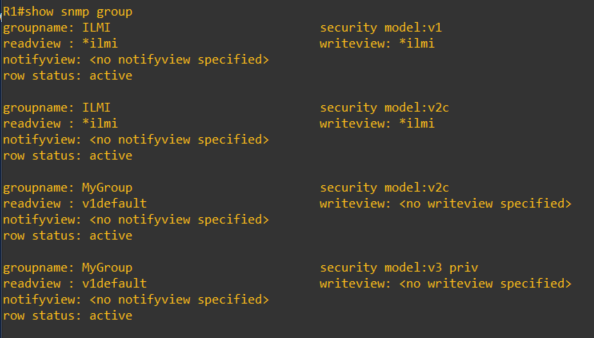
show snmp group

snmpgroup

This article covers some of the SNMP options and configuration of which I am covering in my CCNP studies. For further details, you can visit the Cisco documentations here.

CCNP Route 300-101 – ICMP Unreachable and Redirects

ICMP Destination Unreachable

The ICMP Destination Unreachable is a Type 3 message which is generated by the router to reflect device status being accessed.

ICMP Unreachable Type Code

0  – Network is unreachable

1 – Host is unreachable (telnet to unknown ip address on an existing interface)

2 – Protocol unreachable

3 – Port unreachable (use cisco trace route probe 1)

4 – Fragmentation need but DF set

5 – Source Routing

6 – 8 – unknown errors

9, 10, 13 – Admin Prohibited (telnet an interface with access-list filtering connection)

11, 12,14,15 – QoS, ToS, Precedence

ICMP Redirect

ICMP Redirect is a Type 5 message which routers use to advise source device of a better path.

ICMP Redirect Type Code:

  • 0 – Network
  • 1 – Host
  • 2 – Service & Network
  • 3 – Service & Host

I am covering these topics in my study preparation for CCNP and I will update this article as I go along.

VMware VCP 6.7-DCV – Objective 1.5 – Manage vCenter inventory efficiently

The following notes will assist you to prepare for this objective:

  • What is efficient?
    • Think about vCenter inventory hierarchy and its organization
    • Parents/children/siblings
  • What constructs do you have available to you to organize objects?
    • Datacenter object
    • Cluster object
    • Folder object
    • Resource pool
    • vApp
  • Be aware of dependency
    • Can you create a cluster before a datacenter?
    • Can you put a datacenter in a folder?
    • Try these simple operations in your test lab
  • Are there any constraints on inventory object creation?
    • Resource pools and vApps have scope
  • Can you scale beyond a vCenter?

Reference:

vCenter Server and Host Management Guide pdf – chapter 8 – Organizing the inventory

Manipulating VMware vSphere using PowerCLI

I enjoying using powershell so I started to explore the possibility of using it for manipulating vSphere. Low and behold, welcome to PowerCLI with similar syntax as powershell or it can be called powershell in vSphere.

Firstly, before the vCenter server can be manage, a connection is required. To do so, this command can be executed. It can also be used to connect to a single ESXi Host.

Connect-VIServer [vCenterServer or ESXiHost] -Credential(Get-Credential)

I prefer to use the Get-Credential cmdlet because it will prompt me with a windows dialog box requesting the username and password (It is a very useful cmdlet).

Once connected, to get the List of Cluster , VM or Host the following respective commands can be used:

Get-Cluster

Get-VM

Get-VMHost

To get specific details the name of the object can be added to the cmdlet. The pipe (|) can also be used to get details from specific area.

Example to retrieve all the Virtual machines within Cluster A

Get-Cluster ClusterA | Get-VM

To Get all VMs on ESXi Host A

Get-VMHost ESXiA | Get-VM

Putting an ESXi Host A in Maintenance mode

Set-VMHost ESXiA -State Maintenance

Shutting down the ESXi Host A

Stop-VMHost ESXiA-Force

Startup Virtual machine VM1 and VM2

Start-VM VM1,VM2

Exit Maintenance Mode for ESXi Host A

Set-VMHost ESXiA -State Connected

To get more cmdlet from the VMware PowerCLI, use the get-command [*keyword*] to list all commands with the keyword.

I will update this list as time progress.

VCP65-DCV – Objective 8.1 – Configure Auto Deploy for ESXi Hosts

The following reference material from the vSphere 6.5 online documentation will assist you in covering the main information that is needed to know the topics in this objective:

  1. Introduction to vSphere Auto Deploy
  2. PXE Booting the ESXi Installer
  3. Set up Highly Available vSphere Auto Deploy Infrastructure
  4. Troubleshooting vSphere Auto Deploy
  5. Understanding vSphere ESXi Image Builder
  6. Provisioning ESXi Systems with vSphere Auto Deploy
  7. Provision Host and Set up Host Customizations
  8. What’s new in vSphere 6.5 Auto Deploy (YouTube)