There was an Veeam Backup & Replication job notification with the following error:
Discovering replica VM Error: Unable to find mapping target VmRef [vm-40195]
Error: Unable to find mapping target VmRef [vm-40195]
Based the above error line “unable to find mapping target” means that the replica VM is missing or the replica VM is not mapped to the particular source VM. To resolve this issue, you will need to make the changes to the Replication Job settings for this source VM.
Open the Veeam Backup & Replication console.

Select Replication and right click and select Edit to modify the properties of the selected job.

Under Describe you DR site, tick Low connection bandwidth (enable replica seeding). Note: This allows you get the additional options to check the original VMs mapping to the replica VMs.

Select Seeding on the left side to go directly to the Replica mapping settings.
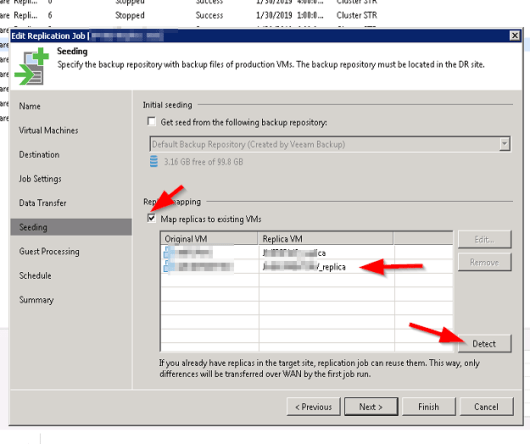
Under Replica Mapping, tick Map replicas to existing VMs if not already ticked.
It will show all the original VMs and their respective replica VMs. If there is a replica VM beside the source VM with error, it means that the replica VM is missing.
Select the Detect button to let Veeam discover all the replica VMs associated with the original VMs in the database. If the replica VM is showing No mapping, it means that the replica VM is missing or it is unable to detect the replica VM.

The replica VM was can manually selected by highlighting the original VM and select Edit. browse the vCenter for the replica and select it (this is only if it exist but not mapping automatically using the Detection method).
Select Finish and retry the failed replica job. One thing to note is when the retry job option is used, only the failed VM replication job is executed.


 IT Wiz Technology Blog