Windows 10: Opening Program management tools and features from command prompt

Sometimes you may want to run open Programs and Features without searching for it in the Control Panel. Another reason to require these commands is to run them with administrative privileges.

You can open the Run using [Windows KEY] + [R] or the cmd or even in PowerShell ISE

appwiz.cpl – open the Programs and Features window.

appwiz

devmgmt.msc – open the device manager

devmgmt

compmgmt.msc – open the computer management
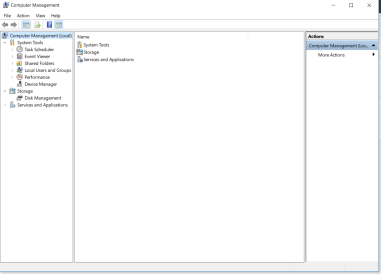
compmgmt

diskmgmt.msc – opens the disk management

diskmgmt

lusrmgr.msc – opens the local users and groups management

lusrmgr

I will update this article with more useful commands as I identify them.


Recovering from a BitLocker System Lockout after a BIOS Update

We had a user who was not abiding by the rules to store all the company data on the network drives to ensure it is protected and backed up by our systems.

The user’s laptop got a BIOS upgrade and unfortunately the laptop was rebooting requesting Bitlocker password. In our environment, Bitlocker passwords are registered in Active Directory upon activation but for some reason unknown to us, it was not there for this particular laptop.

Our colleague at the site, research a way to overcome this challenge and found the following solution:

  1. Download an Application that will allow you to build a bootable USB drive in DOS 32-bit. E.g. RUFUS
  2. Execute your selected application to build bootable USB drive (You might have to first format USB drive at 32-bit).
  3. Download all BIOS updates for the computer model from the vendor support site. (If you remember the previously installed BIOS version, you can download that version from the site)
  4. Boot up the computer with the bootable USB drive and run each BIOS from the command prompt (At this point, you are trying to find the BIOS version before the update was done, if you already know the version just install it).
  5. After updating the BIOS, reboot the computer to verify if Windows boots up successfully.
  6. If unsuccessful, go back to Step 4 and execute the next BIOS version file.
  1.  

    NOTE: Execute your BIOS from the latest to the oldest.

Simple Computer Security Tips

As a computer user, we sometimes take for granted the numerous threats that are out on the internet that can steal and even take over our computers without our permission. It is important that we are aware of the threats that can affects us by just browsing the internet.

I would like to share a few simple tips that will help any person to protect themselves from the various treats on the internet.

  1. Install an Anti-virus software on your computer – this is one of the most important task that any person can do to protect their computer from viruses or malware that can cause our computer to behave abnormal or render it unusable. There are a few paid anti-virus software I can recommend such as Norton Security, Kaspersky Anivirus, ESET Security and McAfee Antivirus. If you dont want to spend money on this then there are also good free antivirus software such as Avast, AVG and Microsoft Security Essential.
  2. Remove the admin privileges from your default user account – This is a very important task because a lot of persons don’t realize that when you have administrator right on your user account that you use daily any changes can be made to the compute without restriction. It is not good because if your computer does get infected then the malicious software can make unwanted changes and you will not have control over it. I recommend that you create a different account with admin rights, then change the user account you use daily to a standard user. See instructions here on how to do this on Windows 10.
  3. Ensure that windows firewall is enabled – This is especially important for person who connect to any and every open WiFi that comes there way. Having the firewall enabled can reduce the likelihood of a unauthorized person from connecting or access your computer from these free open networks. for steps on how to check or enable to windows firewall on your computer, go here. Note: that the latest windows come with the Windows firewall turned on by default.
  4. Backup documents to a secure cloud space – This tip might seem trivial but it is one of the most important task to do. This task does not only protect you from hackers wiping out your data but also protects the important information from devices fail or a computer crash. To accomplish this task you can use one of the free large cloud space such as Google Drive and OneDrive. Note that they also have a desktop sync tool that allows you to sync local folders to the cloud once you are connected to the internet.
  5. Don’t visit any websites that are labelled as unsecure or unsafe – Whether browsing the internet or searching for information to assist in doing a task, we will sometimes get a message from our browser warning us that this site is unsecure. It is best that we don’t continue unless we are absolutely sure that it is legitimate or safe. Current reputable browser such as Google Chrome, Internet Explorer (or Edge) or Firefox has built in Certification Authority that checks a website’s certificate for its authenticity. This is important because we can be visiting a website that is developed by a hacker to get access to our computer or retrieve information from it.

These are the tips in a nutshell but if there are any more, I will update this list. I just want remind you to keep safe and do as much as you can to protect your personal data.