Microsoft: Enabling Recycle Bin feature in Windows Server 2016 Active Directory Domain Services

There is a new feature available in Active Directory Administrative Center (ADAC) in the Windows Server 2016 that allows you restore deleted AD objects from the Recycle Bin (although it could be activated from Windows server 2008 R2 using Powershell). It allows you to enable it at the Domain or Forest level. The only caveat is once it is enabled, it cannot be disabled. The default lifetime for a deleted object to remain in the AD Recycle Bin is 180 days.

To enable the feature using Powershell:

Enable-ADOptionalFeatureIdentity ‘Recycle Bin Feature’Scope ForestOrConfigurationSetTarget ‘domain.com’Server DC1

To enable the feature in Active Directory Administrative Center:

Go to Server Manager –> Tools –> Active Directory Administrative Center

servermgr_Adac

Highlight the domain or forest on the left pane and then under the Task pane on the right under the domain, select Enable Recycle Bin.

Enable_recycleBin_ADAC

You will get the warning that once it is enabled it cannot be disabled, select Ok.

rc_warn

Veeam Replication Error – Unable to discover replica VM

There was an Veeam Backup & Replication job notification with the following error:

Discovering replica VM Error: Unable to find mapping target VmRef [vm-40195]
Error: Unable to find mapping target VmRef [vm-40195]

Based the above error line “unable to find mapping target” means that the replica VM is missing or the replica VM is not mapped to the particular source VM. To resolve this issue, you will need to make the changes to the Replication Job settings for this source VM.

Open the Veeam Backup & Replication console.

veeam_b_r_console

Select Replication and right click and select Edit to modify the properties of the selected job.

veeam_edit_replica_job

Under Describe you DR site, tick Low connection bandwidth (enable replica seeding). Note: This allows you get the additional options to check the original VMs mapping to the replica VMs.

veeam_low_connection

Select Seeding on the left side to go directly to the Replica mapping settings.

veeam_replica_displayed

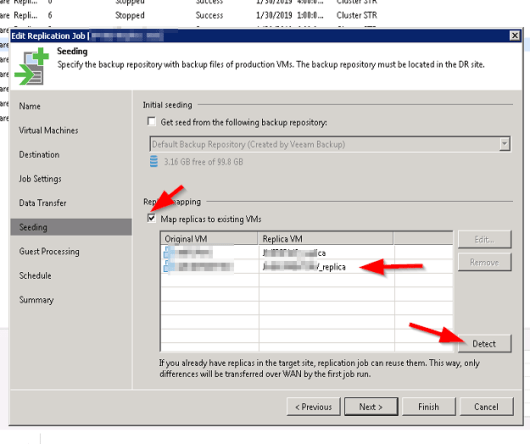
Under Replica Mapping, tick Map replicas to existing VMs if not already ticked.

It will show all the original VMs and their respective replica VMs. If there is a replica VM beside the source VM with error, it means that the replica VM is missing.

Select the Detect button to let Veeam discover all the replica VMs associated with the original VMs in the database. If the replica VM is showing No mapping, it means that the replica VM is missing or it is unable to detect the replica VM.

veeam_detect_replica

The replica VM was can manually selected by highlighting the original VM and select Edit. browse the vCenter for the replica and select it (this is only if it exist but not mapping automatically using the Detection method).

Select Finish and retry the failed replica job. One thing to note is when the retry job option is used, only the failed VM replication job is executed.

VCP65-DCV – Objective 6.1 – Configure and Administer vCenter Appliance Backup/Restore

The following reference material from the vSphere 6.5 online documentation will assist you in covering the main information that is needed to know the topics in this objective:

  1. VMware VCSA 6.5 Backup and Restore How-To (vladan.fr)
  2. Know about the SEAT (Stats, Events and Tasks) in VAMI (get familiar with the interface)
  3. Know about the VAMI – use port 5480
  4. Know the difference destination for backup – FTP, FTPS, HTTP(s) and SCP