Microsoft Certification Learning Resources

This article was created for me to keep track of the Microsoft Learning resources available to acquire the knowledge needed to prepare for the Microsoft Certifications.

The material includes preparation for following certifications:

  • AZ-900
  • AZ-104
  • AZ-800/AZ-801
  • AZ-500
  • AZ-700
  • AZ-305
  • AZ-400
  • AZ-140
  • SC-300
  • MS-900
  • MS-500 (expires June 30, 2023)
  • MS-100/ MS-101 (expires July 31, 2023) / MS-102
  • AI-900
  • AI-102
  • DP-900
  • DP-420
  • DP-300

Microsoft Learn
https://learn.microsoft.com/en-us/

Microsoft Learning Lab Exercises
https://github.com/MicrosoftLearning

Microsoft Azure Connected Learning Experience (CLX)
https://clx.cloudevents.ai/events/39366311-ad15-4b90-9364-0252213842fa

Microsoft Partner Training
https://partner.microsoft.com/en-us/training/training-events

MS365 Lab Resources for Microsoft Partner
https://transform.microsoft.com/modernwork/partner

Microsoft Learn Lab Exercise
https://microsoftlearning.github.io/AZ500-AzureSecurityTechnologies/
https://microsoftlearning.github.io/MS-500-Microsoft-365-Security/
https://microsoftlearning.github.io/SC-300-Identity-and-Access-Administrator/
https://microsoftlearning.github.io/AZ-104-MicrosoftAzureAdministrator/

https://microsoftlearning.github.io/AZ-305-DesigningMicrosoftAzureInfrastructureSolutions/

https://microsoftcloudworkshop.com/

https://microsoftlearning.github.io/AZ500-AzureSecurityTechnologies/

https://microsoftlearning.github.io/AZ-140-Configuring-and-Operating-Microsoft-Azure-Virtual-Desktop/

https://microsoftlearning.github.io/AZ400-DesigningandImplementingMicrosoftDevOpsSolutions/

Microsoft Simulation Guide

https://mslearn.cloudguides.com/en-us/guides/AZ-900%20Exam%20Guide%20-%20Azure%20Fundamentals
https://mslabs.cloudguides.com/guides/DP-900%20Exam%20Guide%20-%20Azure%20Data%20Fundamentals
https://mslabs.cloudguides.com/guides/AI-900%20Exam%20Guide%20-%20Azure%20AI%20Fundamentals

https://mslabs.cloudguides.com/guides/AZ-104%20Exam%20Guide%20-%20Microsoft%20Azure%20Administrator

https://mslabs.cloudguides.com/guides/AZ-700%20Lab%20Simulations%20-%20Designing%20and%20implementing%20Microsoft%20Azure%20networking%20solutions

https://mslabs.cloudguides.com/guides/AZ-800%20Lab%20Simulations%20-%20Administering%20Windows%20Server%20Hybrid%20Core%20Infrastructure

https://mslabs.cloudguides.com/guides/AZ-801%20Lab%20Simulations%20-%20Configuring%20Windows%20Server%20Hybrid%20Advanced%20Services

https://mslabs.cloudguides.com/guides/DP-300%20Lab%20Simulations%20-%20Administering%20Microsoft%20Azure%20SQL%20solutions

https://mslabs.cloudguides.com/guides/AI-102%20Lab%20Simulations%20-%20Designing%20and%20implementing%20a%20Microsoft%20Azure%20AI%20solution

https://mslabs.cloudguides.com/guides/DP-420%20Lab%20Simulations%20-%20Designing%20and%20implementing%20cloud-native%20applications%20using%20Microsoft%20Azure%20Cosmos%20DB

Third party resources:

John Savill – https://learn.onboardtoazure.com/

Susanth Sutheesh – https://www.aguidetocloud.com/

Microsoft Azure Paid Labs environment and Training – ACloudGuru.com

I will update this list as times progresses and the information changes.

Disclaimer: all information is provided as is and if there are any changes Microsoft website is the ultimate authority and the respective producers.

Group Policy Object Processing And Precedence

This article is about the order of processing and precedence of the Group Policy Object (GPO).

There is a acronym used to remember the order of processing:

LSDOU – Local, Site, Domain, OU.

Local GPO

Site linked GPO

Domain linked GPO

Organizational Unit linked GPO

The rule of thumb with precedence for the LSDOU order of processing is that the last GPO applied takes precedence which will be the OU linked GPO. There are additional rules to consider such as when multiple GPOs are applied to an object (e.g. Domain), the GPO are process according to order from top to bottom (1 to …) and the top GPO takes precedence.

Inheriting Parent GPO

In some case there make be nested OUs or Parent and Child domains in which GPOs are inherited from the Parent automatically. The inherited GPOs has the least precedence by default on the child node which can be changed by rearranging the link order.

Enforcing GPO

The precedence of the GPO can change by Enforcing it which will allow it to move to the top (become number 1).


Microsoft: Enabling Recycle Bin feature in Windows Server 2016 Active Directory Domain Services

There is a new feature available in Active Directory Administrative Center (ADAC) in the Windows Server 2016 that allows you restore deleted AD objects from the Recycle Bin (although it could be activated from Windows server 2008 R2 using Powershell). It allows you to enable it at the Domain or Forest level. The only caveat is once it is enabled, it cannot be disabled. The default lifetime for a deleted object to remain in the AD Recycle Bin is 180 days.

To enable the feature using Powershell:

Enable-ADOptionalFeatureIdentity ‘Recycle Bin Feature’Scope ForestOrConfigurationSetTarget ‘domain.com’Server DC1

To enable the feature in Active Directory Administrative Center:

Go to Server Manager –> Tools –> Active Directory Administrative Center

servermgr_Adac

Highlight the domain or forest on the left pane and then under the Task pane on the right under the domain, select Enable Recycle Bin.

Enable_recycleBin_ADAC

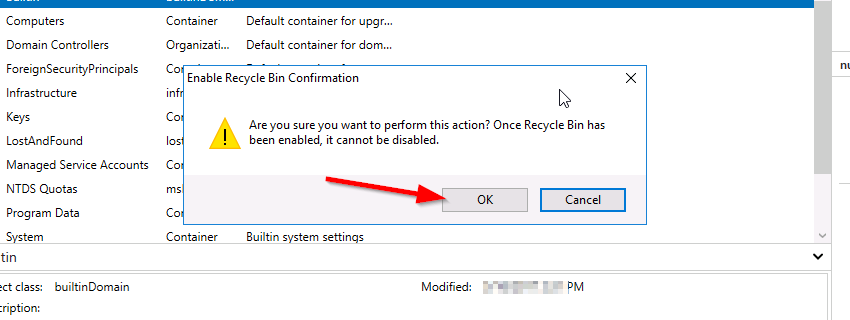
You will get the warning that once it is enabled it cannot be disabled, select Ok.

rc_warn

PowerShell: Get a List of AD Groups a specific user is a member of

Powershell is very versatile and with this wonderful tool, I will share how to get the subject result.

There are two ways of doing this:

  1. Using the cmdlet

Get-ADPrincipalGroupMembership [username] | Format-Table Name -AutoSize

I used the cmdlet with Format-table to output property Name in a table format

2. Using the cmdlet

Get-ADUser [username] -Properties memberof | Select -ExpandProperty memberof | Get-ADGroup | Format-Table Name -AutoSize

I used the additional parameter -Properties to get the variable MemberOf then use the Select cmdlet to expand the array then pipe it to the Get-ADGroup to get the name of group to list it in a table format.

Cert Exam Prep: Exam 70-742: Identity with Windows Server 2016 – Study notes

  1. Install and configure Active Directory Domain Services (AD DS) (20–25%)

Install Active Directory

Know the PowerShell commands:

– Add the binaries

Add-WindowsFeature -name ad-domain-services—lncludeManagementTools -Restart

– Add a new forest

Install-ADDSForest —DomainName ‘corp.contoso.com’

– Add a new domain in an existing forest

Install-ADDSDomain -NewDomainName amer ParentDomainName ‘corp.contoso.com’

– Add a new domain controller in an existing domain

Install-ADDSDomainController —DomainName ‘amer. corp.contoso.com’

– Perform a staged read-only domain controller (RODC) installation

Install-ADDSReadOnlyDomainControl|erAccount –DomainControllerAccountName RODC1 -DomainName amercorp contoso com -SiteName Boston

* Then on RODC1: add the ad-domain-services feature, and domain controller role


Transferring and seizing FSMO roles

Exam Topic – What you should know!

Transfer FSMO Roles

  • Perform this on a domain controller which will be down for maintenance for a period of time, to ensure there is no loss of the fsmo service
  • Move-ADDirectoryServerOperationMasterRo|e -Identity “Target-DC” -OperationMasterRole SchemaMaster,RlDMaster,InfrastructureMaster, DomainNamingMaster,PDCEmulator

Seize FSMO Roles

  • Perform this if a domain controller is down and cannot be recovered, to ensure there is no loss of the FSMO service
  • Move-ADDirectoryServerOperationMasterRole -ldentity “Target-DC’ -OperationMasterRole SchemaMaster,RIDMaster,InfrastructureMaster,DomainNamingMaster,PDCEmulator -Force

FSMO roles can be represented by numbers

  • Move-ADDirectoryServerOperationMasterRole -Identity “Target-DC” -OperationMasterRole 0,1,2,3,4 -Force

– 0: PDC Emulator

– 1: RID Master

– 2: Infrastructure Master

– 3: Schema Master

– 4: Domain Naming Master


Additional common active directory install functions

Install from media

  • Useful when the database is on a domain controller across a slow WAN link
  • Install-ADDSDomainController —DomainName ‘amer.corp.contoso.com” -lnstallationMediaPath C:\ADMedia

Configure a domain controller to not be global catalog server

  • InstalI-ADDSDomainController —DomainName ‘amer.corp.contoso.com” —NoGlobalCatalog

Move the Infrastructure Master FSMO role

  • Needed if the domain controller will be a global catalog server
  • Install-ADDSDomainController —DomainName ‘amer.corp.contoso.com” -MovelnfrastructureMasterRolelfNecessary

Uninstall active directory and demote to a server

  • Uninstall-ADDSDomainController

Time-limited Group Memberships

Users can be added to a security group with time-to-live (TTL)

  • When the TTL expires, the user’s membership in that group disappears

Kerberos token lifetime will be determined by TTL of the user’s memberships

  • TGT (Ticket Generated Ticket) based on shortest group membership
  • ST (Shortest time) based on TGT and resource local domain group membership

Requires new FFL (Force Functional Level)

  • Scavenger thread takes care of cleaning up group memberships


Way to join a computer to the domain

System Control Panel

  • System added to default container unless pre—staged

Windows PowerShell

  • Add-Computer -ComputerName ‘Server1′ -DomainName ‘amer.corp.contoso.com’ -Credential Get-Credential -Restart

  • System added to default container unless pre-staged

Desired State Configuration (DSC)

  • Joins a computer to the domain, and re-joins if it ‘falls out‘ of the domain
  • Uses Start-DscConfiguration cmdlet, and can be set to check compliance every x minutes

Offline domain join

  • Run djoin.exe on a domain controller to pre-stage the object and create provisioning file
  • Run djoin.exe on target computer and point to the provisioning file

Tips

  1. Know the PowerShell commands for installing and managing Active Directory
  2. Active Directory, FSMO Roles, DNS. Group Types and scopes haven’t really changed, but if you haven’t managed them lately, brush up
  3. Desired State Configuration (DSC) can be used to join a server to the domain and rejoin it if necessary


  1. Manage and Maintain AD DS (15-20%)

Configure service authentication

Service Accounts

  • Used to enhance security but the pain point is the password management and SPN mgmt.
  • Two types: Managed Service Accounts and Group Managed Service Accounts

Create/configure Managed Service Accounts

  • Used for a single computer or server
  • New-ADServiceAccount with the —RestrictToSingleComputer parameter
  • Not supported for scheduled tasks, Exchange, SQL

Create/configure Group Managed Service Accounts

  • Used for multiple servers
  • Minimum of one DC that runs at least Windows Server 2012
  • Before you begin, must create KDS Root Key: Add-KDSRootKey -Effectivelmmediately
  • New-ADServiceAccount and Set-ADServiceAccount

Configure Kerberos delegation

  • IIS may require the Trust this computer for delegation to any service (Kerberos only) option

Manage Service Principal Names (SPNs)

  • Use SetSPN <service type>/<instance name>:<port number>/<service name>


Active Directory Domain Services Offline and Defragmentation

There is a tradition method of taking the Microsoft Active Directory Domain Services (AD DS) offline to perform maintenance on the database is using the Directory Service Restore Mode (DSRM). The steps are listed below:

  1. Log into your Domain Controller (DC)
  2. Open the command prompt
  3. Run the command:

    bcdedit /set safeboot dsrepair

  4. Reboot the DC so the it can enter into safe mode

To exit the safe mode, run the command

bcdedit /deletevalue safeboot

and then reboot for the DC to return to normal mode.

Another method of taking the AD DS offline is by stopping the AD DS service using the services applet (services.msc).

Now to perform defragmentation on the AD DS database is to use the NTDS utility.

Execute the following command at the prompt:

ntdsutil

activate instance ntds

files

compact to c:\

integrity

quit

quit

copy c:\ntds.dit c:\windows\ntds\ntds.dit

del c:\windows\ntds\*.log

Restart the AD DS services.

Restart-Service NTDS

Please note that you don’t have to restart the server after the maintenance of the database.