CCNP Route 300-101 – Policy Based Routing

Policy-based routing (PBR) is a process whereby the device puts packets through a route map before routing them.  (Cisco Reference)

Policy Based Routing is applicable to scenarios where you want to route a source IP address through a specific gateway IP address to a specific destination. Policy Based Routing relies on route-map to performs it functions which then uses access-list or prefix list to identify the respective source or destination IP address.
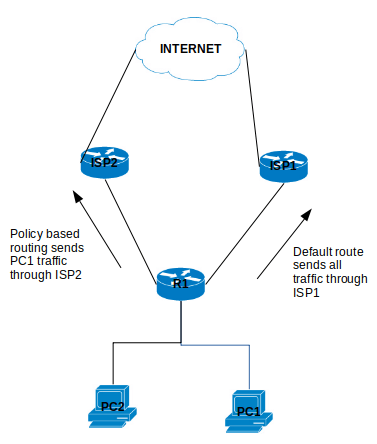
policybasedrouting

Configure Policy Based Routing

Step 1 – Configure Access list

R1(config)# ip access-list standard PC1-INT

R1(config-access-list)# permit ip host [PC1-IPAddress] [DestinationIP-Subnet]

Step 2 – Configure the Route map

R1(config)# route-map ISP2-INT [Sequence#]

R1(config-route-map)# match ip address [ISP2-INT]

R1(config-route-map)# set ip next-hop [ISP2]

Step 3 – Apply the Route map on the inbound interface

R1(config)# interface f0/0

R1(config-f)# ip policy route-map ISP2-INT

That is it for the configuration example for the Policy Based Routing.

There are a number of points to note about PBR:

  1. The implicit deny at the end of the route-map does not drop the packet but allow the  traffic to be routed but the normal routing table.
  2. There is an option to include a keyword “default” in the route-map set parameter which tells the router to check the routing table for this destination address before apply the next hop:
    1. set ip default next-hop [IPAddress]
  3. Match all parameter can be applied by not setting any match conditions in the route map.


This is it for the Policy Based Routing and you can refer to Cisco documentation for further information.


CCNP Route 300-101 – Unicast Reverse Path Forwarding (uRPF)

Unicast Reverse Path Forwarding (uRPF) is a feature that allows the router to block unknown source IP address or spoofed IP address on an incoming interface. uRPF uses Cisco Express Forwarding (CEF) FIB to perform its function which means only CEF capable devices are supported.

uRPF has two modes:

  • Strict mode – uRPF only check source ip address of packets on configured interface.
  • Loose mode – uRPF check source ip address of packets on any interface. This mode is preferred for networks that has multiple up-links or interface.

Strict mode configuration

R1(config-if)# ip verify unicast source reachable-via rx [access-list]

The RX parameter determines the strict mode in the command

Loose mode configuration

R1(config-if)# ip verify unicast source reachable-via any [access-list]

The Any parameter determines the loose mode in the command

uRPF verification

You can verify the blocking of spoofed ip address by using the following command:

show ip interface [interface #] | section IP verify

The verification drops shows the number of drop spoofed source packets on the interface as seen in the image below.uRPF

R2 spoofed IP address 1.2.2.2 is trying to reach destination ip address 3.3.3.3 but it is blocked by R1 using uRPF. You can see R1 show command displays 5 verification drops.

You can also create an access-list to log any deny packets and assigned it to the uRPF using the following command:

! Create Extended Access-list

R1(config)# access-list 100 deny ip any any log

! Under the interface assigned access-list to the uRPF

R1(config-if)# ip verify unicast source reachable-via rx 100

for the same example of R1, the uRPF packet drop will be shown by the access list 100 log as seen below:

uRPF_accesslist-log

I hope this article helps to understand the use uRPF.