Disable IE Enhanced Security Configuration in Windows Server via script

I have always want to use a script to disable Internet Explorer Enhanced Security Configuration (IE ESC) in Windows Server. It is an annoying activity when it is required to perform tasked using the IE in older versions of windows servers.

It is important to note that IE ESC is very important to the security of legacy servers from common past vulnerabilities which is not a risk in current versions of server OS.

This activity must be taken with precaution and on servers with access restriction to the Internet. It is encouraged that IT professional implement all measures to secure the legacy application running on these servers that must be maintained in an segmented or isolated environment. It is the responsibility of the IT professional to use a secure alternative browser after this activity has been performed.

Now here is a batch script to the rescue taken from this Microsoft FAQ that can be runned on all your servers. Save the script in a batch file and run it from the command line.

The script must run as an administrator or a logon script to work since it is making changes to the registry.

Note: The script was created for Windows Server 2003 and 2008. However, it will work for other versions such as Windows Server 2019.

ECHO OFF
REM  IEHarden Removal Project
REM  HasVersionInfo: Yes
REM  Author: Axelr
REM  Productname: Remove IE Enhanced Security
REM  Comments: Helps remove the IE Enhanced Security Component of Windows 2003 and 2008(including R2)
REM  IEHarden Removal Project End
ECHO ON
::Related Article
::933991 Standard users cannot turn off the Internet Explorer Enhanced Security feature on a Windows Server 2003-based terminal server
::http://support.microsoft.com/default.aspx?scid=kb;EN-US;933991
:: Rem out if you like to Backup the registry keys
::REG EXPORT "HKEY_LOCAL_MACHINE\SOFTWARE\Microsoft\Active Setup\Installed Components\{A509B1A7-37EF-4b3f-8CFC-4F3A74704073}" "%TEMP%.HKEY_LOCAL_MACHINE.SOFTWARE.Microsoft.Active Setup.Installed Components.A509B1A7-37EF-4b3f-8CFC-4F3A74704073.reg"
::REG EXPORT "HKEY_LOCAL_MACHINE\SOFTWARE\Microsoft\Active Setup\Installed Components\{A509B1A7-37EF-4b3f-8CFC-4F3A74704073}" "%TEMP%.HKEY_LOCAL_MACHINE.SOFTWARE.Microsoft.Active Setup.Installed Components.A509B1A8-37EF-4b3f-8CFC-4F3A74704073.reg"
REG ADD "HKEY_LOCAL_MACHINE\SOFTWARE\Microsoft\Active Setup\Installed Components\{A509B1A7-37EF-4b3f-8CFC-4F3A74704073}" /v "IsInstalled" /t REG_DWORD /d 0 /f
REG ADD "HKEY_LOCAL_MACHINE\SOFTWARE\Microsoft\Active Setup\Installed Components\{A509B1A8-37EF-4b3f-8CFC-4F3A74704073}" /v "IsInstalled" /t REG_DWORD /d 0 /f
::x64
REG ADD "HKEY_LOCAL_MACHINE\SOFTWARE\Wow6432node\Microsoft\Active Setup\Installed Components\{A509B1A8-37EF-4b3f-8CFC-4F3A74704073}" /v "IsInstalled" /t REG_DWORD /d 0 /f
::Disables IE Harden for user if set to 1 which is enabled
REG ADD "HKEY_CURRENT_USER\Software\Microsoft\Windows\CurrentVersion\Internet Settings\ZoneMap" /v "IEHarden" /t REG_DWORD /d 0 /f
REG ADD "HKEY_LOCAL_MACHINE\Software\Microsoft\Windows\CurrentVersion\Internet Settings\ZoneMap" /v "IEHarden" /t REG_DWORD /d 0 /f
REG ADD "HKEY_CURRENT_USER\Software\Wow6432Node\Microsoft\Windows\CurrentVersion\Internet Settings\ZoneMap" /v "IEHarden" /t REG_DWORD /d 0 /f
::Removing line below as it is not needed for Windows 2003 scenarios. You may need to enable it for Windows 2008 scenarios
::Rundll32 iesetup.dll,IEHardenLMSettings
Rundll32 iesetup.dll,IEHardenUser
Rundll32 iesetup.dll,IEHardenAdmin
Rundll32 iesetup.dll,IEHardenMachineNow
::This apply to Windows 2003 Servers
REG DELETE "HKEY_LOCAL_MACHINE\SOFTWARE\Microsoft\Windows\CurrentVersion\Setup\OC Manager\Subcomponents" /v "iehardenadmin" /f /va
REG DELETE "HKEY_LOCAL_MACHINE\SOFTWARE\Microsoft\Windows\CurrentVersion\Setup\OC Manager\Subcomponents" /v "iehardenuser" /f /va
REG ADD "HKEY_LOCAL_MACHINE\SOFTWARE\Microsoft\Windows\CurrentVersion\Setup\OC Manager\Subcomponents" /v "iehardenadmin" /t REG_DWORD /d 0 /f
REG ADD "HKEY_LOCAL_MACHINE\SOFTWARE\Microsoft\Windows\CurrentVersion\Setup\OC Manager\Subcomponents" /v "iehardenuser" /t REG_DWORD /d 0 /f
::REG DELETE "HKEY_LOCAL_MACHINE\SOFTWARE\Microsoft\Active Setup\Installed Components\{A509B1A7-37EF-4b3f-8CFC-4F3A74704073}" /f /va
::REG DELETE "HKEY_LOCAL_MACHINE\SOFTWARE\Microsoft\Active Setup\Installed Components\{A509B1A8-37EF-4b3f-8CFC-4F3A74704073}" /f /va
:: Optional to remove warning on first IE Run and set home page to blank. remove the :: from lines below
:: 32-bit HKCU Keys
REG DELETE "HKEY_CURRENT_USER\Software\Microsoft\Internet Explorer\Main" /v "First Home Page" /f
REG ADD "HKEY_CURRENT_USER\Software\Microsoft\Internet Explorer\Main" /v "Default_Page_URL" /t REG_SZ /d "about:blank" /f
REG ADD "HKEY_CURRENT_USER\Software\Microsoft\Internet Explorer\Main" /v "Start Page" /t REG_SZ /d "about:blank" /f
:: This will disable a warning the user may get regarding Protected Mode being disable for intranet, which is the default.
:: See article http://social.technet.microsoft.com/Forums/lv-LV/winserverTS/thread/34719084-5bdb-4590-9ebf-e190e8784ec7
:: Intranet Protected mode is disable. Warning should not appear and this key will disable the warning
REG ADD "HKEY_CURRENT_USER\Software\Microsoft\Internet Explorer\Main" /v "NoProtectedModeBanner" /t REG_DWORD /d 1 /f
:: Removing Terminal Server Shadowing x86 32bit
REG DELETE "HKEY_LOCAL_MACHINE\SOFTWARE\Microsoft\Windows NT\CurrentVersion\Terminal Server\Install\Software\Microsoft\Windows\CurrentVersion\Internet Settings\ZoneMap" /v "IEHarden" /f
:: Removing Terminal Server Shadowing Wow6432Node
REG DELETE "HKEY_LOCAL_MACHINE\SOFTWARE\Wow6432Node\Microsoft\Windows NT\CurrentVersion\Terminal Server\Install\Software\Microsoft\Windows\CurrentVersion\Internet Settings\ZoneMap" /v "IEHarden" /f

The script may display errors for some commands depending on the versions of Windows servers due the registry keys not used in that versions.

Most importantly, ensure to verify the settings changed for the Internet Explorer ESC.
Method of Changing the SID of a Windows Server 2016 VM

In a virtual environment, there are scenarios where you would want to clone an existing Windows server virtual machine to provide redundancy for whatever application.

Having the ability to create duplicate virtual machines by cloning it is a great feature but it creates a problem in a Windows Active Directory environment. There is a unique identifier called Security ID also known as SID which is created during installation to identify each machine in a Windows environment.

Active Directory has a big problem when it discovers two machines with the same SID because it identify them as the same object. If the computer with the same SID attempts to join the same domain, it will generate an error and terminate the process. No worries, there is a solution for the Windows computer.

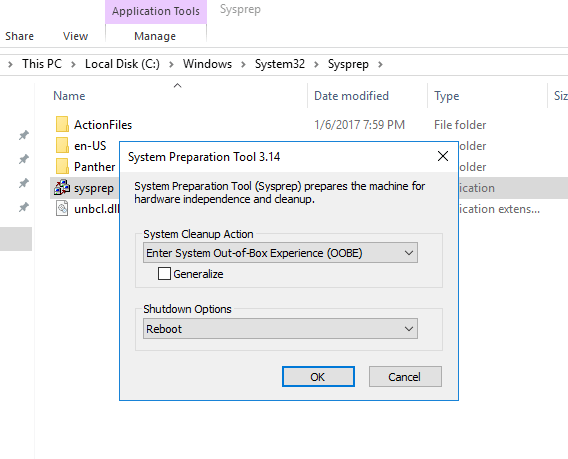
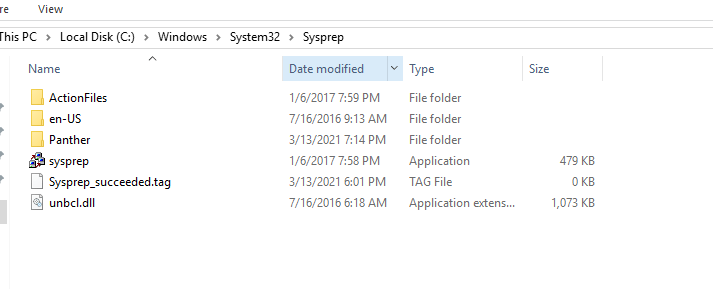
Microsoft has included a tool called Sysprep which is natively installed on Windows server which is located in the folder path:

%systemroot%\System32\Sysprep

To start the process, you will navigate to the folder and follow the steps below:

  • Right click and Run the System Preparation Tool (Sysprep.exe) as an administrator
  • Select the option Enter System Out-of-Box Experience (OOBE) for System Cleanup Action with the option Generalize ticked.
  • Select the Shutdown option: Reboot
  • Then select OK.

Once the virtual machine reboots, it will prompt to select the usually Microsoft settings during initialization, accept the EULA and to set the Administrator password.

Note that this method does not remove any installed applications except device drivers. It also removes the usually windows configuration such as IP address and machine name.

The SysPrep will work in other versions of Windows.

reference: https://docs.microsoft.com/en-us/windows-hardware/manufacture/desktop/sysprep–generalize–a-windows-installation

VMware VCP 6.7-DCV – Objective 1.8 – Differentiate between VDS and VSS

The following notes will assist you to prepare for this objective:

  • You will need to know the features set of both type of switch
    • Standard and Distributed switch
    • Select the appropriate switch given a scenario
    • Understand level of effort in administration
  • Don’t let questions mislead you on feature set
    • Standard switches have significant functionality
  • Learn what the standards actually mean
    • IEEE 802.1q / IEEE 802.3ad
  • Also be able to differentiate discovery protocols
    • When would you use LLDP or CDP?
    • Does that affect switch choice?
  • Be able to determine when a feature is appropriate
    • Health check
    • Beacon probing – detect uplink failure
    • Notify switches – switch cache mac address
    • Roll back
    • Traffic shaping
    • NIOC
  • Questions on NIC teaming rules are possible
  • Can you draw out how traffic flows given each load balancing algorithm is used?
    • Route based on originating virtual port
    • Route based on source MAC hash
    • Route based on source IP hash
    • Route based on physical NIC load
    • Explicit failover order

Reference:

vSphere Networking Guide pdf – Chapter 8 – Networking Policies

VMware VCP 6.7-DCV – Objective 1.7 – Describe and identify resource pools and use cases

The following notes will assist you to prepare for this objective:

  • Resource management is an essential skills for passing VCP-DCV
    • What resource are you being asked to control?
    • Different resources have different controls
  • Know the resource pool settings
    • You need to be able to select the right settings for a scenario
    • Proportional share allocation
  • Why use resource pools

Reference:

VMware VCP 6.7-DCV – Objective 1.9 – Describe the purpose of cluster and the features it provides

The following notes will assist you to prepare for this objective:

  • Be aware of additional features of both HA and DRS
    • HA provides option to enable VM fault tolerance
    • HA provides optional VM Component Protection
    • DRS rules control placement (affinity)
    • DRS provides optional DPM
  • Make sure you have read and experimented with admission control
    • Remember this is a gating of VM power on operations
    • What is slot size? Different from %?
  • Ultimately DRS is automating vMotion
    • So what stops vMotion from working?
    • Incompatible CPUs!
  • Ensure you have looked at Enhanced vMotion Compatibility (EVC)
    • Can you explain CPU masking?
    • Can you pick the appropriate use-case from implementation of either?
  • You need to have awareness of vMotion Encryption

Reference:

vSphere Availability Guide pdf – Chapter 2 – Creating and Using vSphere HA Clusters

vSphere Resource Management Guide pdf

  • Chapter 10 – Managing Resource Pools
  • Chapter 11 – Creating a DRS Cluster

vSphere Security Guide pdf – Chapter 6 – Encrypted vSphere vMotion

VMware VCP 6.7-DCV – Objective 1.10 – Describe virtual machine (VM) file structure

The following notes will assist you to prepare for this objective:

  • You need to know the files that make up a VM and what they do
    • VMX, VMDK, VSWP, VMSD, VMSN, etc
  • You need to know their behaviour
    • What gets created if missing?
    • What is naming convention of files?
    • What is the snapshot naming behaviour?
    • Any differences between VMFS5 and VMFS6?
    • How do resources reservation affects files?
  • You should also be familiar with virtual disk types
  • Try in your home lab to create VMs with
    • Thin provisioned disk
    • Thick provisioned disk
    • Eager zero thick provisioned disk
    • Could you convert from one disk type to another? How exactly?
  • Get to a vSphere host command line and look at what gets created
    • Nothin like doing to lock this into your memory!

Reference: vSphere ESXi vCenter-Server 67 Virtual Machine Admin Guide pdf

VMware VCP 6.7-DCV – Objective 1.6 – Describe and differentiate among vSphere, HA, DRS, and SDRS functionality

The following notes will assist you to prepare for this objective:

  • HA has come a long way, don’t rely on legacy knowledge of HA to meet objective
  • Learn the newer features, pre-reqs and limitations of:
    • Proactive HA
    • Orchestrated Restart
    • Fault Tolerance (FT) vSMP
  • HA can’t work around everything
    • For example datastore connectivity loss or unable to satisfy reservation
  • Ensure you can explain the basic modes of DRS
    • Disable, Manual, Partial, Full Automated, per-VM
  • DRS has come a long way
    • Predictive DRS
    • Limitations of vMotion have been overcome
  • What are the vMotion pre-reqs?
    • CPU compatibility
    • Network configuration
    • Compatible virtual hardware
  • What virtual hardware options can and cannot be migrated with DRS?
  • SDRS often gets overlooked
    • Remember it has 2 dimensions to optimization
      • Space utilization & I/O latency
      • What are you being asked in the question?

Reference: 

vSphere Availability Guide pdf

vSphere Resource Guide pdf

Brian Graf Blog – https://www.brianjgraf.com/2016/10/17/vsphere-6-5-vsphere-ha-whats-new-part-3-orchestrated-restart/

VMware VCP 6.7-DCV – Objective 1.5 – Manage vCenter inventory efficiently

The following notes will assist you to prepare for this objective:

  • What is efficient?
    • Think about vCenter inventory hierarchy and its organization
    • Parents/children/siblings
  • What constructs do you have available to you to organize objects?
    • Datacenter object
    • Cluster object
    • Folder object
    • Resource pool
    • vApp
  • Be aware of dependency
    • Can you create a cluster before a datacenter?
    • Can you put a datacenter in a folder?
    • Try these simple operations in your test lab
  • Are there any constraints on inventory object creation?
    • Resource pools and vApps have scope
  • Can you scale beyond a vCenter?

Reference:

vCenter Server and Host Management Guide pdf – chapter 8 – Organizing the inventory

VMware VCP 6.7-DCV – Objective 1.4 – Differentiate between NIOC and SIOC

The following notes will assist you to prepare for this objective:

  • This objective is about managing noisy neighbors!
    • NIOC for network & SIOC for storage
  • You need to demonstrate understanding of
    • What dimensions you can control and applied-to
    • Limitations of service
    • Pre-reqs for implementation
  • Foundation knowledge of proportional share allocation is expected
    • What does low, medium & high mean?
    • What happens when you use numbers instead of labels?
    • How does the power on of another VM affect share allocation?

Reference:

vSphere Resource Management Guide pdf – Chapter 9-Managing Storage I/o Resources

vSphere Networking Guide pdf – Chapter 11 – vSphere Network I/O Control

VMware VCP 6.7-DCV – Objective 1.3 – Describe storage types for vSphere

The following notes will assist you to prepare for this objective:

  • Ensure you are clear on the differences between
    • Block (LUN/vVOL)
    • File access
    • vSAN
  • Read storage questions slowly and carefully
    • Are you being asked about VMs and their virtual hard disks?
    • Are you being asked about what storage vSphere can address?
  • VMware loves acronyms
    • For this objective, you need to learn lots of them
  • For example
    • Can you differentiate SIOC from VAIO?
    • Do you know if RDM is possible with NFS?
    • Happy with VASA providers?

Reference: vSphere 6.7 Storage Guide