VMware VCP 6.7-DCV – Objective 1.8 – Differentiate between VDS and VSS

The following notes will assist you to prepare for this objective:

  • You will need to know the features set of both type of switch
    • Standard and Distributed switch
    • Select the appropriate switch given a scenario
    • Understand level of effort in administration
  • Don’t let questions mislead you on feature set
    • Standard switches have significant functionality
  • Learn what the standards actually mean
    • IEEE 802.1q / IEEE 802.3ad
  • Also be able to differentiate discovery protocols
    • When would you use LLDP or CDP?
    • Does that affect switch choice?
  • Be able to determine when a feature is appropriate
    • Health check
    • Beacon probing – detect uplink failure
    • Notify switches – switch cache mac address
    • Roll back
    • Traffic shaping
    • NIOC
  • Questions on NIC teaming rules are possible
  • Can you draw out how traffic flows given each load balancing algorithm is used?
    • Route based on originating virtual port
    • Route based on source MAC hash
    • Route based on source IP hash
    • Route based on physical NIC load
    • Explicit failover order

Reference:

vSphere Networking Guide pdf – Chapter 8 – Networking Policies

VMware VCP 6.7-DCV – Objective 1.7 – Describe and identify resource pools and use cases

The following notes will assist you to prepare for this objective:

  • Resource management is an essential skills for passing VCP-DCV
    • What resource are you being asked to control?
    • Different resources have different controls
  • Know the resource pool settings
    • You need to be able to select the right settings for a scenario
    • Proportional share allocation
  • Why use resource pools

Reference:

VMware VCP 6.7-DCV – Objective 1.9 – Describe the purpose of cluster and the features it provides

The following notes will assist you to prepare for this objective:

  • Be aware of additional features of both HA and DRS
    • HA provides option to enable VM fault tolerance
    • HA provides optional VM Component Protection
    • DRS rules control placement (affinity)
    • DRS provides optional DPM
  • Make sure you have read and experimented with admission control
    • Remember this is a gating of VM power on operations
    • What is slot size? Different from %?
  • Ultimately DRS is automating vMotion
    • So what stops vMotion from working?
    • Incompatible CPUs!
  • Ensure you have looked at Enhanced vMotion Compatibility (EVC)
    • Can you explain CPU masking?
    • Can you pick the appropriate use-case from implementation of either?
  • You need to have awareness of vMotion Encryption

Reference:

vSphere Availability Guide pdf – Chapter 2 – Creating and Using vSphere HA Clusters

vSphere Resource Management Guide pdf

  • Chapter 10 – Managing Resource Pools
  • Chapter 11 – Creating a DRS Cluster

vSphere Security Guide pdf – Chapter 6 – Encrypted vSphere vMotion

Windows 10: Opening Program management tools and features from command prompt

Sometimes you may want to run open Programs and Features without searching for it in the Control Panel. Another reason to require these commands is to run them with administrative privileges.

You can open the Run using [Windows KEY] + [R] or the cmd or even in PowerShell ISE

appwiz.cpl – open the Programs and Features window.

appwiz

devmgmt.msc – open the device manager

devmgmt

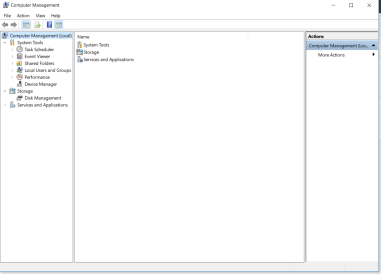
compmgmt.msc – open the computer management

compmgmt

diskmgmt.msc – opens the disk management

diskmgmt

lusrmgr.msc – opens the local users and groups management

lusrmgr

I will update this article with more useful commands as I identify them.


CCNP Route 300-101 – Policy Based Routing

Policy-based routing (PBR) is a process whereby the device puts packets through a route map before routing them.  (Cisco Reference)

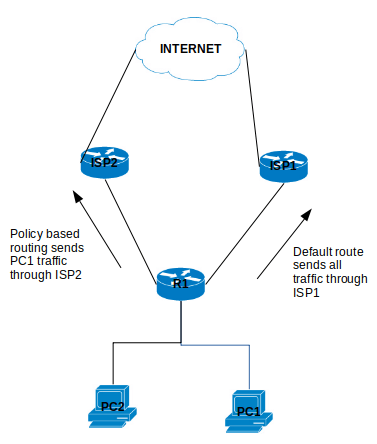
Policy Based Routing is applicable to scenarios where you want to route a source IP address through a specific gateway IP address to a specific destination. Policy Based Routing relies on route-map to performs it functions which then uses access-list or prefix list to identify the respective source or destination IP address.

policybasedrouting

Configure Policy Based Routing

Step 1 – Configure Access list

R1(config)# ip access-list standard PC1-INT

R1(config-access-list)# permit ip host [PC1-IPAddress] [DestinationIP-Subnet]

Step 2 – Configure the Route map

R1(config)# route-map ISP2-INT [Sequence#]

R1(config-route-map)# match ip address [ISP2-INT]

R1(config-route-map)# set ip next-hop [ISP2]

Step 3 – Apply the Route map on the inbound interface

R1(config)# interface f0/0

R1(config-f)# ip policy route-map ISP2-INT

That is it for the configuration example for the Policy Based Routing.

There are a number of points to note about PBR:

  1. The implicit deny at the end of the route-map does not drop the packet but allow the  traffic to be routed but the normal routing table.
  2. There is an option to include a keyword “default” in the route-map set parameter which tells the router to check the routing table for this destination address before apply the next hop:
    1. set ip default next-hop [IPAddress]
  3. Match all parameter can be applied by not setting any match conditions in the route map.


This is it for the Policy Based Routing and you can refer to Cisco documentation for further information.


CCNP Route 300-101 – VRF lite

This article is going to take you through the configuration of VRF lite. VRF stands for Virtual Routing/Forwarding which is technology that allows you to have multiple routing tables that are kept isolated on a router. It is a feature similar to VLANs on a switch. VRF lite allows you to use the same subnets for each

You can refer to this Cisco document for further details: https://www.cisco.com/c/en/us/td/docs/switches/lan/catalyst4500/12-2/25ew/configuration/guide/conf/vrf.html#wp1045190

Note that VRF is usually used when configuring MPLS but because we are not using it with MPLS, it is referred to as VRF lite.

Configuration of VRF lite for IPv4

The following steps will be required to successfully configure VRF lite:

  1. Create the VRF and set the route distinguisher (rd)

R1(config)# ip vrf [NAME]

R1(config-vrf)# rd 100:1

2. Assigning the interfaces to the VRF (Note: VRF clears the interface IP address so you will have to reconfigure the ip address after applying this command)

R1(config-if)# ip vrf forwarding [NAME]

Review VRF Configuration

  1. Show the Assigned VRF Interfaces

R1# show ip vrf interfaces

2. Show the VRFs

R1# show ip vrf

3. Show the Routing Table within a VRF

R1# show ip route vrf [NAME]

4. Show the routing protocols operating within VRF

show ip protocol vrf [NAME]

Configure EIGRP and VRF Lite

R1(config)# router eigrp AS

R1(config-router)# address-family ipv4 vrf [NAME] autonomous-system AS

R1(config-router-af)#network [Subnet] [wildcard_mask]

Configure OSPF and VRF Lite

R1(config)# router ospf [Process-id] vrf [NAME]

Configure RIPv2 and VRF Lite

R1(config)# router rip

R1(config-router)# address-family ipv4 vrf [NAME]

Configuration of VRF lite for both IPv4 & IPv6

  1. Create the VRF and set the route distinguisher (rd)

R1(config)# vrf definition [NAME]

R1(config-vrf)# rd 100:1

R1(config-vrf)#address-family [ipv4|ipv6]

2. Assigning the interfaces to the VRF (Note: VRF clears the interface IP address so you will have to reconfigure the ip address after applying this command)

R1(config-if)# ip vrf forwarding [NAME]

Export and Import Routes from one VRF to another

Importing routes from another VRF using the RD (route distinguisher)

R1(config-vrf)# route-import [RD]

Exporting routes from the VRF using the RD (route distinguisher)

R1(config-vrf)# route-export [RD]

example:

ip vrf GREEN

rd 100:1

route-export 100:1234

ip vrf RED

rd 200:1

router-import 100:1234

Set Default VRF Lite Name

This commands allows you to configure the router in the stated VRF mode.

R1#routing-context vrf [VRFNAME]

R1%VRFNAME#


CCNP Route 300-101 – SNMP

SNMP stands for Simple Network Management Protocol which is uses to manage your network devices by a management host.

There are three versions of SNMP:

  • SNMPv1
  • SNMPv2c
  • SNMPv3

SNMPv1 and SNMPv2c uses community-string as password which is sent in clear text.

On the other hand, SNMPv3 is able to provide both authentication and encryption to secure the communication. SNMPv3 uses users and groups to grant access which is applied using one of the three security levels.

The SNMPv3 Security Levels:

  • noAuthPriv (noauth)- provides no Authentication or Privacy (encryption)
  • AuthNoPriv (auth) – provides Authentication but no Privacy (encryption)
  • AuthPriv (priv) – provides Authentication and Privacy (encryption)

The authentication supports two algorithms: MD5 and SHA1, while encryption supports algorithms DES, 3DES and AES.

 Configuring SNMPv3

1. Configure the View

snmp-server view [VIEWNAME] iso included

2. Configure the Group

snmp-server group [GROUPNAME] v3 [noauth|auth|priv] [read RName] [write WName] [context CName] [notify NName] [access ACL]

3. Configure the User

snmp-server user [Username] [GroupName] v3 [encrypt] auth [md5|sha] [AuthPWD] priv [des|3des|aes] [PrivPassword] [access ACL]

4. Configure Traps

snmp-server host [IP] traps version [1|2|3] [noauth|auth|priv] [USER] [other_snmp_options]

Verify SNMPv3

show snmp user

snmpuser

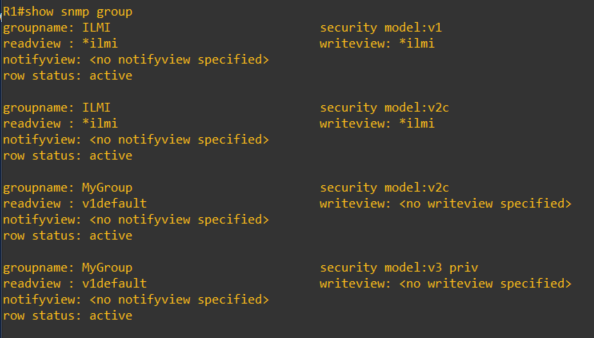
show snmp group

snmpgroup

This article covers some of the SNMP options and configuration of which I am covering in my CCNP studies. For further details, you can visit the Cisco documentations here.

CCNP Route 300-101 – PPPoE

PPPoE is the ability to negotiate a direct PPP link between multiple layer 3 devices
through a layer 2 switched infrastructure. This negotiation then allows the encapsulation of IP packets inside of PPP which is then encapsulated inside an Ethernet frame.

definition reference: https://learningnetwork.cisco.com/docs/DOC-27502

PPPoE Session Process

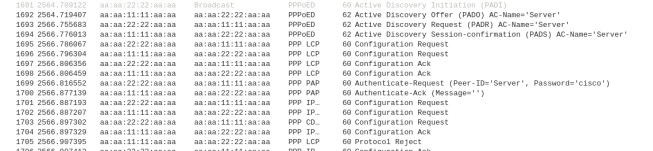
  1. PPPoED Active Discovery Initiation (PADI) – The PPPoE client sends a broadcast
  2. PPPoED Active Discovery Offer (PADO) – The PPPoE server reply with an session offer
  3. PPPoED Active Discovery Request (PADR) – The PPPoE client request to connect to session
  4. PPPoED Active Discovery Session-confirmation (PADS) – The PPPoE server confirms session connection

PPPoED Active Discovery Terminate (PADT) – the session is terminated  by client/server or due to configuration mismatch after it is shared between client and server.

The image below display a wireshark capture of the PPPoE session process mentioned above. Client MAC address contains 1111 and the Server contains 2222.
PPPoE_pcap

Configuring PPPoE Server

1. Configure the virtual template interfaces which allows server to set the configuration template for the each client virtual interface.

R(config)# interface virtual-template 1

R(config-if)# ip address [IP] [Mask]

!Configuring the MTU is necessary so that you don’t have packet fragmentation due to PPP use 2 Bytes and PPPoE uses 6 Bytes of the packet

R(config-if)# mtu 1492

!The peer command is optional if you want to assign an ip address to the clients from a static or DHCP pool

R(config-if)# peer default ip address [pool|dhcp|dhcp-pool] NAME

!The PPP Authentication is optional

R(config-if)# ppp authentication [pap|chap] callin

! After configuring the PAP/CHAP Authentication, you need to configure a username and password

R(config)# username [USER] password [PASSWORD]

2. Configure the Broadband Aggregation (BBA) Group which is used to spawn a virtual interface for each client that dials into the server and assign the virtual template.

R(config)# bba-group pppoe global
R(config-bba-group)#virtual-template 1

3. Configure the physical interface through which the clients will be connecting and assign it the bba group.

R(config)# interface [interface id]

R(config-if)#pppoe enable group global

R(config-if)# no shutdown

Configuring the PPPoE Client

1. Configure the interface Dialer

R(config)# interface Dialer 1

R(config-if)# encapsulation ppp

R(config-if)# ip address

R(config-if)#mtu 1492

R(config-if)#dialer pool 2

!Optional to configure authentication if server requires it

!PAP configuration to send username and password if needed by server

R(config-if ) ppp pap send-uername [USER] password [PASSWORD]

!CHAP configuration to send username(hostname) and password

R(config-f)ppp chap password [PASSWORD]

R(config-f)ppp chap hostname [USER]

2. Associate the physical interface with the dialer on which the PPPoE session will dial out.

R(config)# interface f0/0

R(config-if)# pppoe-client dial-pool-number 2

R(config-if)# no shutdown

Verify and Troubleshoot PPPoE

To verify pppoe is working, use the following commands:

1. Display the PPPoE session – show if the session is established

R# show pppoe session

2. Use debug to show PPPoE Events – displays PADI/PADO/PADR/PADR process

R#debug pppoe events

3. Use debug to show PPP negotiation – displays ppp configuration exchange

R#debug ppp negotiation

This is it for the PPPoE, I hope it helps in knowing how to configure PPPoE.

CCNP Route 300-101 – EIGRP

EIGRP routing protocol for IPv4 and IPv6

  • Default hello messages timer: 5 seconds
  • Default hold-down timer: 15 seconds
  • Multicast address: 224.0.0.10 (IPv4) / FF02::A (IPv6)
  • IP Protocol: 88
  • Administrative distance of 90
  • Autonomous Number is required to be the same with the neighbors.

Basic EIGRP Configuration

!IPv4 EIGRP configuration

R(config)# router eigrp [AS]

R(config)#network [subnet] [wildcard_mask]

!IPv6 EIGRP configuration

R(config)# ipv6 router eigrp 1
R(config-router) eigrp router-id [X.X.X.X]
R(config-router) no shutdown

!Configure command under participating interface in IPv6 EIGRP

R(config-if) ipv6 eigrp [AS]

EIGRP Metrics

To enable to metric for EIGRP, you use the following commands:

R(config-router)# metric weights 0 [K1] [K2] [K3] [K4] [K5]

Where the K values are:

  • K1 – Bandwidth [Kbit/sec] (default 1)
  • K2 –  Load (default 0)
  • K3 – Delay (default 1)
  • K4 and K5 – Reliability (default 0)

Calculating the full Metric (Formula)

Metric = ([K1 * bandwidth + (K2 * Bandwidth) / (256 – Load) + K3 * Delay] * [K5 / (Reliability + K4)]) * 256

Calculating the Default Metric

eigrp_metric_calculation

EIGRP Packets

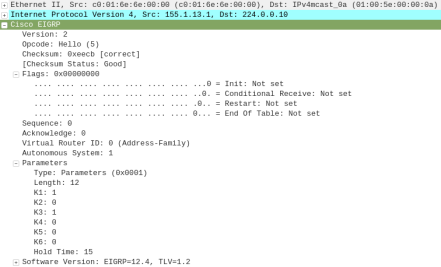
  • Hello (5)

eigrp_hello

  • Update (1)

eigrp_update

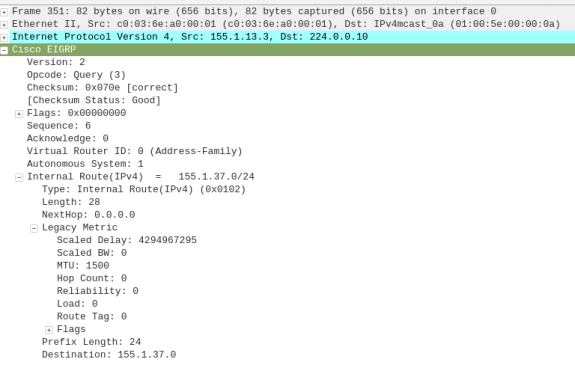
  • Query (3)

eigrp_query

  • Reply (4)

eigrp_reply

  • Ack (5)

eigrp_Hello_Ack

Administrative Distance (AD) – is how far is the router from it’s neighbor.

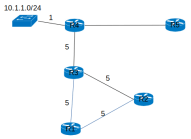
Feasible Distance (FD) – is how far is the router for the destination subnet.eigrp_diagram

  • R1 FD from 10.1.1.0/24 through R3
    • = (R1–>R3) + (R3–>R4) + (subnet 10.1.1.0/24)
    • = 5 + 5 + 1 = 11


Feasible successor – the advertised distance (AD) must be less than the feasible distance (FD) of the Successor (Feasible Successor AD < Successor FD)

EIGRP Neighborship

When the neighbor command is used, it forces the EIGRP to use unicast traffic to discover the neighbor.

R1(config-router)# neighbor [ip address]

The command and out display of the EIGRP neighbor:

show ip eigrp neighbors

show_eigrp_neighbor-cmd

As i continue my studies, this article will be updated.