
In a virtual environment, there are scenarios where you would want to clone an existing Windows server virtual machine to provide redundancy for whatever application.
Having the ability to create duplicate virtual machines by cloning it is a great feature but it creates a problem in a Windows Active Directory environment. There is a unique identifier called Security ID also known as SID which is created during installation to identify each machine in a Windows environment.
Active Directory has a big problem when it discovers two machines with the same SID because it identify them as the same object. If the computer with the same SID attempts to join the same domain, it will generate an error and terminate the process. No worries, there is a solution for the Windows computer.
Microsoft has included a tool called Sysprep which is natively installed on Windows server which is located in the folder path:
%systemroot%\System32\Sysprep
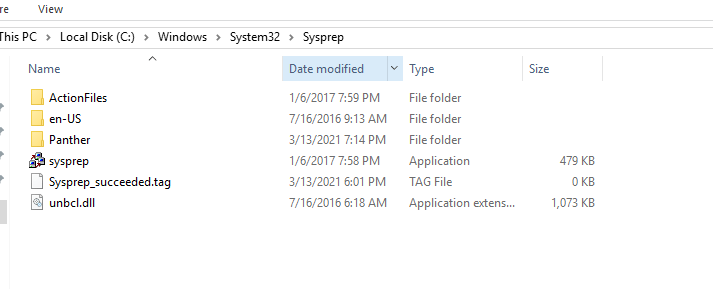
To start the process, you will navigate to the folder and follow the steps below:
- Right click and Run the System Preparation Tool (Sysprep.exe) as an administrator

- Select the option Enter System Out-of-Box Experience (OOBE) for System Cleanup Action with the option Generalize ticked.
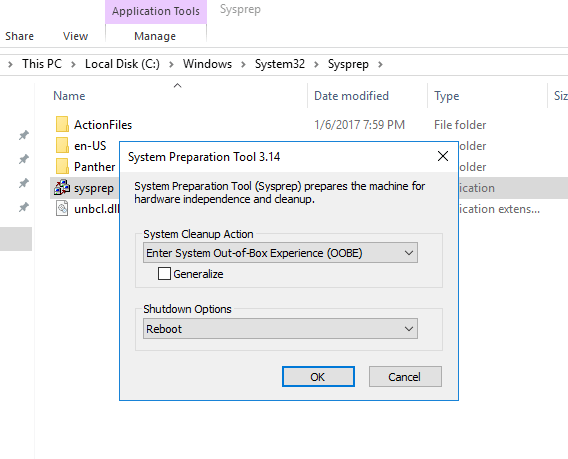
- Select the Shutdown option: Reboot
- Then select OK.
Once the virtual machine reboots, it will prompt to select the usually Microsoft settings during initialization, accept the EULA and to set the Administrator password.
Note that this method does not remove any installed applications except device drivers. It also removes the usually windows configuration such as IP address and machine name.
The SysPrep will work in other versions of Windows.
 IT Wiz Technology Blog